Building a Professional Transportation and Logistics Website with WordPress
By WordPress Experts |
Developing WordPress websites for transportation and logistics presents unique challenges that require careful planning and execution.
The specialized functionality needed for fleet coordination, shipment monitoring, and reservation systems can prove demanding even for seasoned website creators.
This comprehensive guide provides a systematic approach to constructing a functional transportation and logistics website that effectively serves business requirements. You can avoid the frustration of testing numerous plugins or grappling with complex coding.
Instead, we'll demonstrate proven tools and methodologies for implementing essential features including booking systems, fleet management, and real-time tracking capabilities.
Essential Features for Logistics and Transportation Websites
Whether establishing a new transportation enterprise or managing an established logistics operation, maintaining a professional website has become essential rather than optional for connecting with customers digitally.
Businesses lacking professional websites often encounter difficulties presenting their services clearly and communicating efficiently with prospective clients. This challenge becomes particularly significant in today's digital environment where online information access is expected.
Consider industry leaders who have established high standards for logistics website functionality. Features like shipment tracking have evolved from optional enhancements to fundamental customer expectations. Providing these capabilities has become necessary for maintaining competitive positioning.
Beyond tracking functionality, an effective logistics and transportation website must incorporate established website best practices. These include responsive design for optimal viewing across devices, rapid loading speeds to prevent visitor abandonment, and robust security measures to protect against unauthorized access.
With these considerations in mind, let's examine how to develop a transportation and logistics website using WordPress, the market's leading website platform. Use the following navigation links to move through the implementation steps:
- Step 1: Select Hosting and Domain Registration
- Step 2: Establish a New WordPress Website
- Step 3: Select a Transportation-Focused WordPress Theme
- Step 4: Develop a Homepage with Service Presentation
- Step 5: Configure Essential Website Pages
- Step 6: Implement Cargo Tracking Functionality
- Step 7: Incorporate Shipping Cost Calculation
- Step 8: Create Pickup Scheduling Forms
- Step 9: Activate Payment Processing Options
- Step 10: Develop Quotation Request Forms
- Step 11: Integrate Live Communication Features
Step 1: Select Hosting and Domain Registration
The initial phase involves registering for WordPress hosting services. For those unfamiliar with web hosting, this service stores and displays website files to make them publicly accessible online.
Many WordPress professionals recommend selecting hosting providers that offer strong value, performance, and user-friendly interfaces suitable for beginners new to website management.
Some hosting providers include complimentary domain registration and SSL certificates for enhanced security. These features can be beneficial when establishing a new website.
Since you'll operate a logistics website, consider hosting plans designed for substantial traffic volumes. This ensures your site remains operational and responsive even during periods of high customer activity, such as simultaneous delivery tracking requests. This approach minimizes concerns about website performance during peak usage times.
Simply select the appropriate plan option for your requirements.

After selecting a hosting plan, choose a domain name representing your website's online address.
Generally, domains incorporating brand names work effectively. You might also include transportation or logistics-related keywords following the brand name for additional context.
For assistance selecting appropriate domain names, consult available resources on domain selection strategies for WordPress websites. You might also experiment with business name generation tools to explore various options.
Once you've decided on a domain name, enter it into the designated field and proceed with the search function.
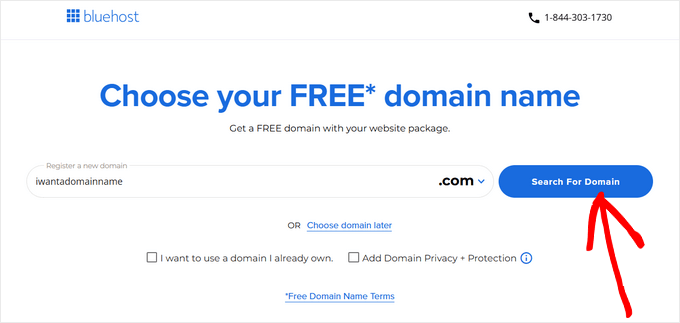
Following this step, continue to the checkout process.
You'll be prompted to provide account information including business email address, contact name, country, telephone number, and related details.
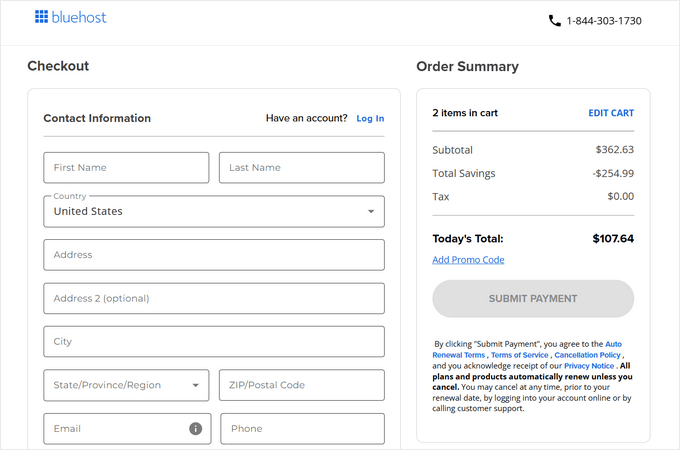
At this stage, provide payment information to complete the transaction.
You'll subsequently receive confirmation email containing login credentials for your hosting dashboard, which serves as the control panel for managing your logistics website.
Step 2: Establish a New WordPress Website
Some hosting providers automatically install WordPress on your hosting service by default, potentially allowing you to bypass this section.
However, if you need to establish another WordPress site on the same hosting plan or missed this step, follow these instructions.
First, navigate to the website management section in your hosting dashboard. Then, select the option to add a new site.
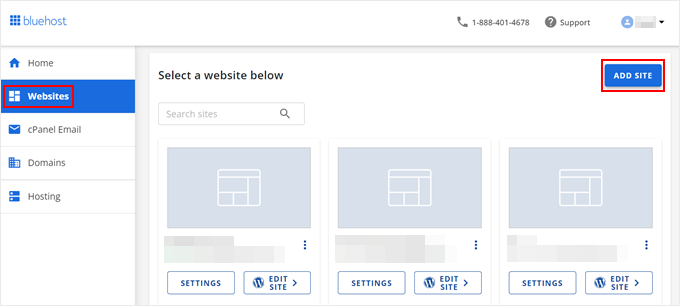
The website setup wizard will now appear.
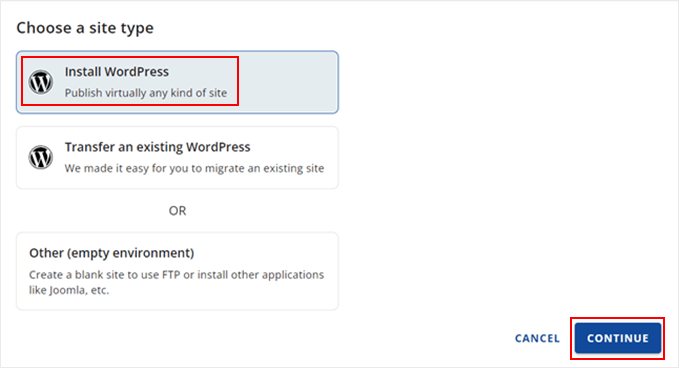
To begin, select the WordPress installation option and proceed.
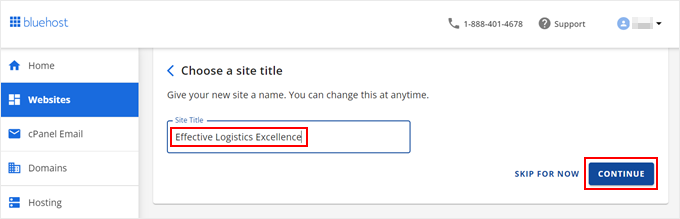
You can now enter a title for your website.
After completing this step, continue to the next phase.
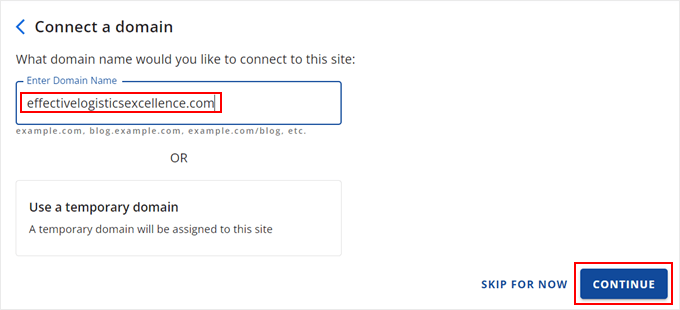
At this stage, connect a domain name to your website.
You can associate an existing domain or utilize a temporary subdomain until you're prepared to register a new domain name.