A Comprehensive Guide to Selling Canva Templates on Your WordPress Site
By Editorial Team |
Offering Canva templates through a WordPress website presents an excellent opportunity to generate revenue from design expertise while expanding your reach to potential customers.
Many individuals and businesses are willing to invest in professionally designed templates that streamline their creative processes and save valuable time.
Numerous experienced developers utilize Canva for creating visual content across various platforms. Many have successfully implemented WordPress solutions alongside digital product management tools to establish thriving online stores for downloadable items.
This guide will demonstrate the complete process for setting up a Canva template business using WordPress, enabling you to establish a source of recurring revenue.
Benefits of Selling Canva Templates
Unlike more complex design software, Canva provides an intuitive interface that allows users of all skill levels to produce polished graphics. This accessibility means you don't need extensive graphic design training to create marketable templates for others.
Additionally, Canva offers a free version with substantial functionality. For access to premium resources including extensive photo libraries, video content, typography options, and advanced features, the Pro subscription provides enhanced capabilities at reasonable monthly or annual rates.
Why consider selling Canva templates as a business model?
Canva templates have gained significant popularity among individuals and organizations seeking efficient design solutions. Many turn to template creators for inspiration and time-saving resources. Additional advantages include:
- Recurring revenue: Digital products can generate income continuously after the initial creation phase, providing ongoing returns.
- Scalable operations: You can expand earnings by gradually adding more digital products to your online store.
- Low overhead: Primary costs involve website establishment, with optional expenses for enhanced tools that improve selling efficiency.
- Versatile applications: Template creation spans numerous niches, from fitness tracking systems and dietary planners to social media graphics that help businesses produce engaging visual content efficiently.
While third-party marketplaces exist for selling templates, these platforms typically claim a percentage of your profits and offer limited control over presentation and promotion.
Establishing your brand identity is crucial, which makes WordPress an ideal platform for selling Canva templates. You maintain complete control over the customer experience and business operations.
Popular Canva Template Categories for Sale
Before launching your template business, consider which types of designs will resonate with your target audience.
The versatility of Canva allows for countless template possibilities. Some of the most sought-after categories include:
- Blog imagery and featured post graphics
- Social media visuals (including thumbnails, banners, stories, and posts)
- Planning systems and calendar templates
- Presentation slides and deck designs
- Educational workbooks and activity sheets
- Culinary menus, recipe cards, and event invitations
- Professional resume formats
- Digital sticker collections
- Seasonal greeting cards
- Business materials including cards, posters, brochures, and flyers
- Contract templates
- Productivity system templates
To determine your product focus, consider your audience's specific challenges. Which templates could simplify their workflows and reduce time spent on design tasks?
Validate your concept by researching existing market demand. Examine template marketplaces to assess customer feedback and identify successful products.
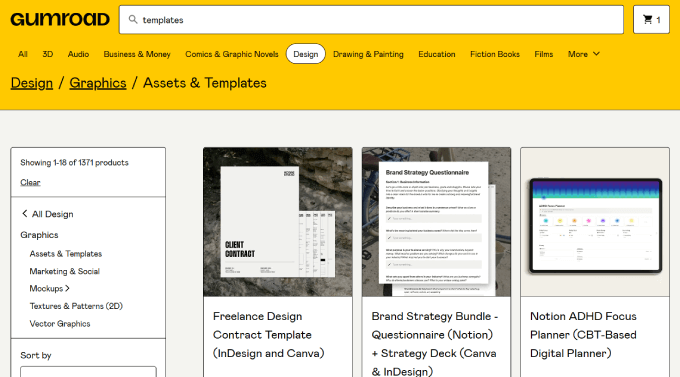
Once you've selected your template focus, you're ready to begin the creation and sales process.
Start by establishing a Canva account if you haven't already. After registration, follow these implementation steps.
Step 1: Establishing Your WordPress Foundation
To sell Canva templates effectively, you must first establish a properly configured WordPress website.
This requires three essential components: reliable hosting services, a domain name, and security certification.
Web hosting provides storage space for your website files, images, and content. Your domain name serves as your online address, while security certification protects data transmission between visitors and your site.
Selecting appropriate hosting is crucial for your template business.
Many WordPress experts recommend managed hosting solutions optimized for digital product sales. These services often include preconfigured e-commerce functionality, automated backups, security features, and performance optimization tools.
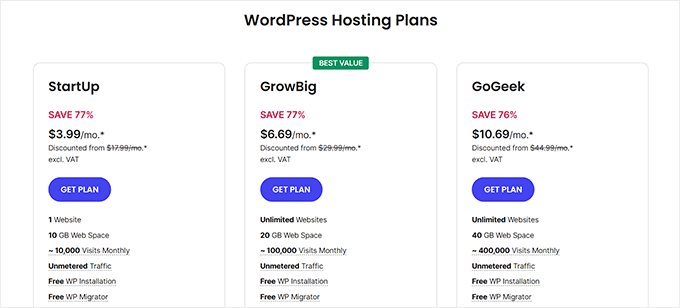
Managed hosting plans typically include substantial introductory discounts along with essential features like automated backups, security certification, email services, and various optimization capabilities.
The setup process begins with selecting a hosting provider and plan that matches your business requirements.
Visit your chosen hosting provider's website and review available plan options.
After selecting an appropriate plan, proceed to the registration process.
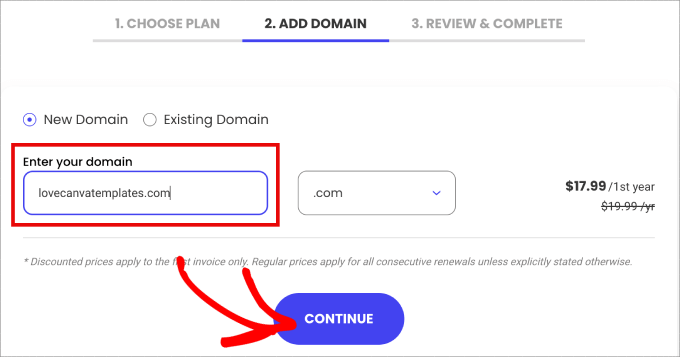
Enter your preferred domain name and continue through the registration workflow.
Complete the account information form and consider optional additions like domain privacy protection.
Provide payment details to finalize your hosting purchase and gain access to your account management interface.
You'll receive confirmation email with login instructions for your hosting control panel.
Follow the provided instructions to access your account dashboard. Navigate to the website management section and select the administration tools for your domain.
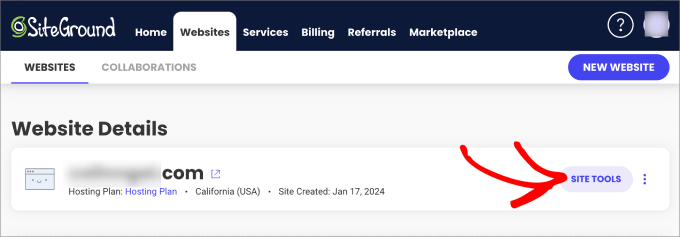
This interface provides access to essential website management functions including email configuration and file management.
Select the WordPress installation option.
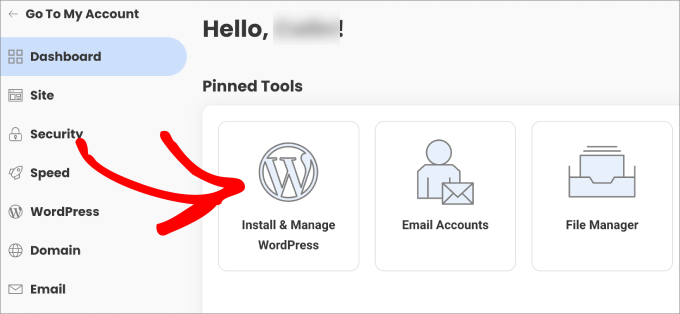
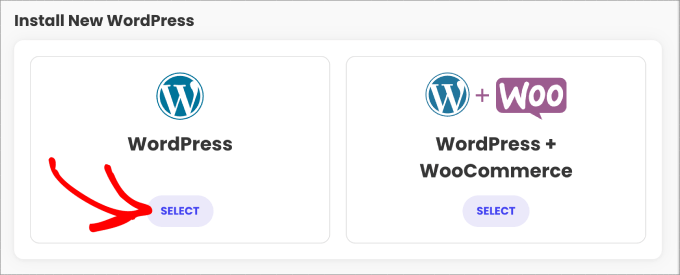
You'll typically encounter options for standard WordPress installation or e-commerce optimized setups.
Choose the standard WordPress installation.
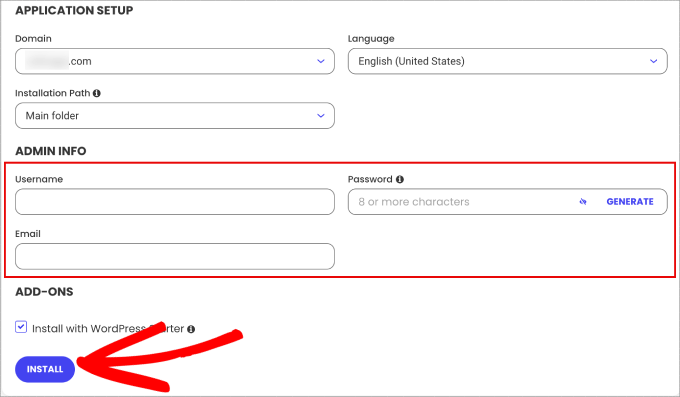
The installation form will appear for completion.
Create secure login credentials including username and password, then associate the installation with your preferred email address.
Initiate the installation process to access your WordPress dashboard, where digital product management tools will be available for configuration.
Step 2: Developing Marketable Canva Templates
Access your Canva account and navigate to the template creation interface. From the main dashboard, locate the template section in the navigation panel.


