9 Strategic Steps to Build a Powerful WordPress Content Strategy
By WordPress Expert |
Do you find yourself struggling to organize and plan meaningful content for your website or blog?
A WordPress platform offers tremendous capabilities, yet many site owners fail to maximize its potential by not approaching content creation with clear intention.
Well-crafted content draws appropriate visitors, addresses their inquiries, delivers sought-after information, and fosters a community around your offerings.
Here are nine strategic approaches to developing an impactful content strategy within WordPress.
This guide covers multiple essential areas. Use this navigation to jump directly to sections of interest:
- Identify User Search Intent
- Analyze Current Traffic Sources
- Understand Your Audience Demographics
- Evaluate High-Performing Content
- Address Declining Performance
- Identify Content Gaps
- Learn From Competitor Success
- Leverage AI for Content Discovery
- Implement a Content Calendar
1. Identify User Search Intent
With millions of search queries processed every minute, understanding what information users seek enables you to provide valuable answers. This process begins with keyword research.
Keywords represent the specific terms and phrases entered into search engines when users look for content.
Numerous research tools, both free and premium, help uncover relevant keywords within your niche. Several useful options will be discussed throughout this guide.
Consider starting with tools like LowFruits, which simplifies discovering keyword variations related to your WordPress site. Enter any term connected to your business, and the tool generates lists of related keywords, questions, and variations.
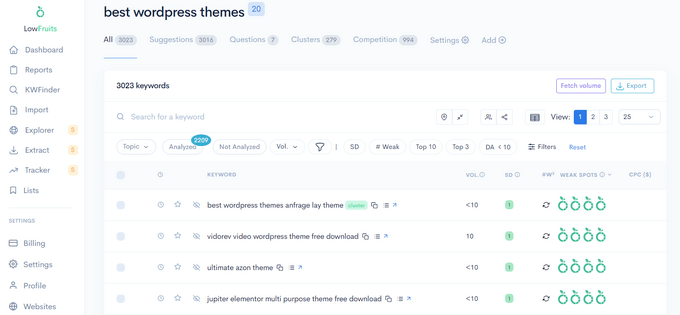
These suggestions reveal potential topics for content creation. Incorporate these keywords naturally within your blog posts.
Additionally, such tools often highlight opportunities in search results where lower-authority sites rank for specific terms, indicating potentially easier ranking possibilities.
Google Trends provides another valuable perspective by showing keyword popularity fluctuations over time. This reveals whether specific terms are gaining or losing traction, or experience seasonal search patterns.
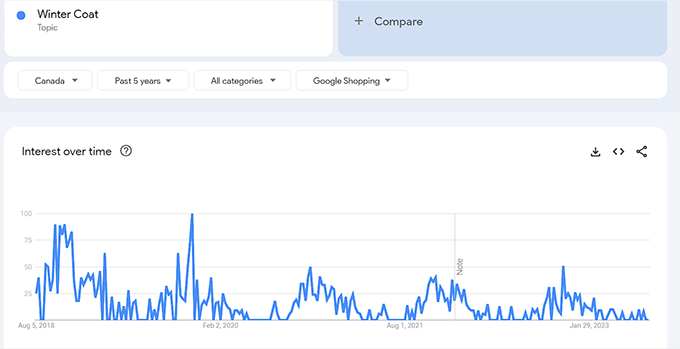
This data helps identify emerging topics and optimal timing for seasonal content, such as summer themes, winter subjects, or holiday-related articles.
2. Analyze Current Traffic Sources
After compiling general keyword research, examine the specific phrases currently driving visitors to your WordPress site. These represent terms you already rank for.
Google Search Console serves as an excellent free resource for monitoring your site's presence in search results, though its interface can present challenges for beginners.
Many WordPress professionals utilize analytics plugins that integrate with Google Search Console to present data in more accessible formats directly within the dashboard.
These solutions typically provide reports listing the top search terms attracting visitors to your site.
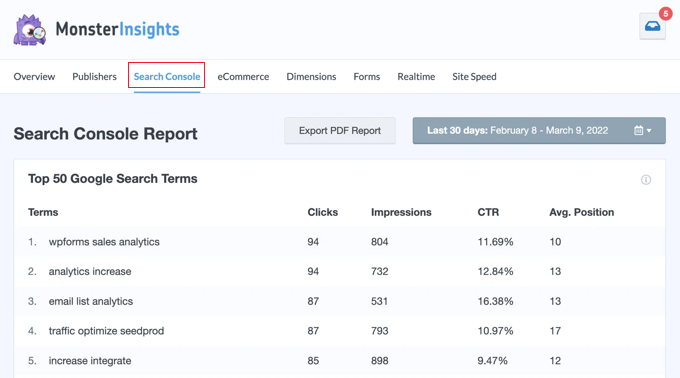
This information reveals topics already resonating with your audience. Since you're receiving traffic for these keywords, creating additional content around these subjects can enhance your search performance.
Evaluate whether your existing content targets appropriate keywords. If posts targeting specific terms generate minimal traffic, consider improving or expanding that content.
3. Understand Your Audience Demographics
Successful content planning revolves around understanding your target audience—the individuals you aim to reach with your products or services.
This group typically shares similar demographics, requirements, and interests. Comprehending these characteristics enables creation of more engaging material.
Google Analytics provides comprehensive visitor information, including geographical location, device specifications, browser preferences, and screen resolutions.
Many WordPress users access this demographic data through integrated dashboard reports that present Google Analytics information in user-friendly formats.
These reports often display visitor age and gender distributions at a glance, providing valuable insights for content planning.
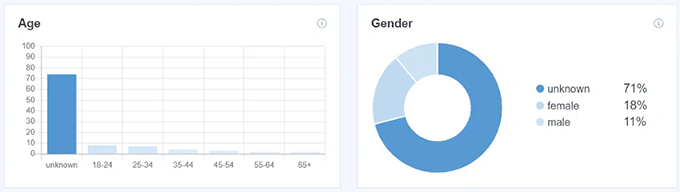
For instance, content style and tone should differ when targeting young female audiences versus middle-aged male visitors.
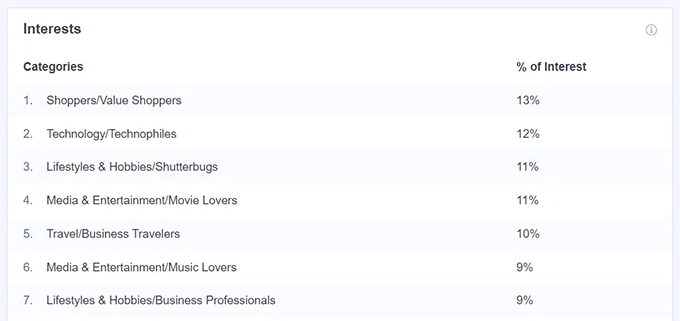
These reports frequently include interest categories, revealing topics that captivate your audience—valuable data for content planning.
If demographic data surprises you by revealing an unexpected audience, consider adjusting your content strategy accordingly when planning new material and updates.
4. Evaluate High-Performing Content
When developing a content strategy, examine existing material that already performs well—posts attracting substantial traffic where visitors spend significant time.
Identifying your most important pages and posts provides crucial insights.
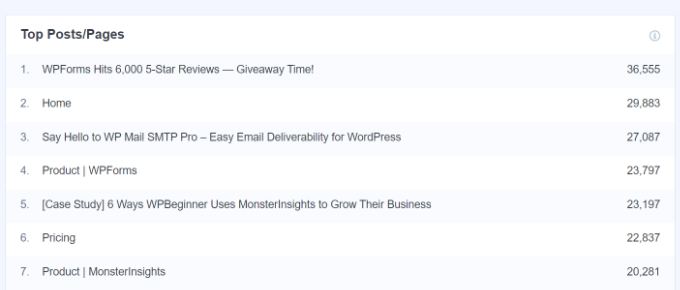
Once you recognize top-performing content, plan additional material on similar topics to expand your traffic.
Review keyword rankings for successful articles. Scheduling updates and optimizations may improve their search positions.
Advanced analytics solutions offer detailed reporting on popular authors, top categories, focus keywords, and preferred post types.
This information supports development of data-driven content strategies. For example, if certain authors consistently produce successful content, their techniques can inform team training. Identifying popular categories reveals topics warranting additional coverage.
5. Address Declining Performance
Content planning involves not only creating new articles but also regularly updating existing material to maintain relevance and accuracy.
Content decay occurs when posts gradually lose traffic and search rankings over time. Without updates, this decline continues.
This phenomenon results from outdated information, superior competitor content targeting the same keywords, decreasing search volume for those terms, or search algorithm changes.
Many website owners consider content decay a significant challenge.
Monitoring individual post performance through WordPress SEO solutions helps address this issue. These tools assist with website optimization for search engines.
Performance reports typically display your best-performing posts and pages alongside content experiencing declines, enabling strategic updates.