Two Simple Methods for Embedding Apple Podcasts in WordPress
Many content creators find that adding podcast episodes from Apple Podcasts to their WordPress sites presents unexpected challenges. Like numerous website owners, they seek straightforward solutions that don't require technical expertise.
Through extensive testing and practical experience, several effective approaches for embedding Apple Podcasts content in WordPress have been identified. After evaluating these methods thoroughly, the most reliable solutions for podcasters and WordPress users have been determined.
This guide provides detailed instructions for embedding Apple Podcasts in WordPress, ensuring your audio content displays properly and functions correctly across all devices.
Whether you're showcasing your own podcast or featuring episodes from other creators, these techniques enable you to present an attractive, fully functional podcast player.
Benefits of Embedding Apple Podcasts in WordPress
Apple Podcasts represents one of the leading platforms for discovering and listening to podcasts across Apple devices including iPhones and iPads.
If you host an audio program on Apple Podcasts, embedding episodes on your WordPress website serves as an effective promotional strategy to expand your audience reach.
Rather than using external links or basic audio players, you can display episodes directly on your podcast website where visitors can begin listening immediately.
When you embed your podcast content:
- Visitors can listen without navigating away from your website.
- You enhance engagement metrics and increase time spent on your site.
- Your podcast maintains brand consistency by appearing alongside your other content.
- Your website becomes a central location for promoting your show, sharing additional content, and growing your audience independently.
Perhaps most significantly, new website visitors who discover your brand or business will immediately become aware of your podcast, potentially gaining numerous new listeners.
Even if you're not embedding your own content, featuring Apple Podcasts episodes on your website provides an excellent way to share recommended podcasts or curate relevant audio content.
For instance, bloggers might include pertinent episodes to supplement articles or support key arguments. Businesses and authors can feature podcast appearances as credibility indicators.
Additionally, online course creators could incorporate embedded interviews or discussions as supplementary material for students.
Methods for Embedding Apple Podcasts in WordPress
Now that you understand the advantages of embedding Apple Podcasts in WordPress, here are two straightforward approaches that require no technical skills.
You can use these quick references to navigate between methods:
- Method 1: Embed Apple Podcasts Using the Custom HTML Block (Free and Simple)
- Method 2: Embed Apple Podcasts Using EmbedPress (Enhanced Customization)
- Additional Suggestions for Podcast Growth
- Common Questions About Embedding Apple Podcasts
Let's begin with the first method.
Method 1: Embed Apple Podcasts in WordPress Using the Custom HTML Block
This approach works effectively if you're using the WordPress block editor and prefer a quick, no-cost method for embedding Apple Podcasts episodes.
No plugins are necessary—simply copy the embed code from Apple Podcasts and insert it into a Custom HTML block.
Note that some WordPress themes may apply different styling to the embedded podcast player. Therefore, preview how it appears on both mobile and desktop devices.
Step 1: Obtaining the Apple Podcast Embed Code
First, navigate to the Apple Podcasts website using any web browser—no iTunes or Apple Podcasts application required.
Next, utilize the search function in the left panel to locate the podcast you wish to feature. You can search by podcast title, episode name, or host name.
For example, searching for a program called 'The Climate Question' would yield relevant results.
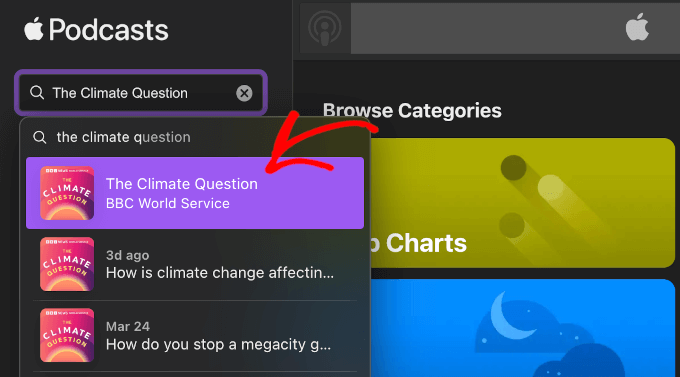
Once you locate the desired content, click the relevant search result to access the show or episode page.
On the podcast page, select the three-dot menu adjacent to the 'Follow' button.

From the dropdown menu, choose 'Copy Embed.'
Apple Podcasts will automatically copy the show's embed code to your clipboard.
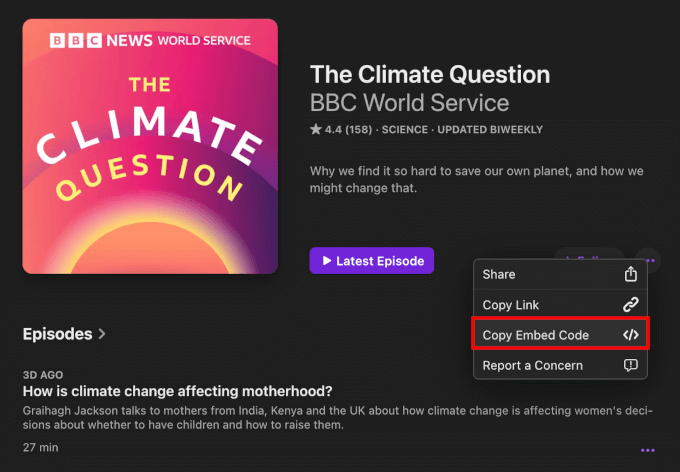
If you prefer to embed a specific episode, scroll down the show page to the 'Episodes' section.
Click the three-dot menu within the episode listing, then select 'Copy Embed Code.'

Alternatively, you can click directly on a specific episode title.
This action navigates to the episode's dedicated page, where you can view a brief description, social media links, contact information, content ratings, and host details.

Once on the episode page, click the three-dot menu beside the 'Play' button and choose 'Copy Embed' from the dropdown options.
With this completed, the episode's embed code is now copied to your clipboard.

Step 2: Implementing the Apple Podcast Embed Code in WordPress
Now that you possess the Apple Podcasts embed code, you can add it to your WordPress website.
The player can be embedded on any post or page. This tutorial demonstrates embedding within a blog post using the block editor.
From your WordPress administration area, navigate to Posts and select Add New, or open an existing post where you want to include the podcast.
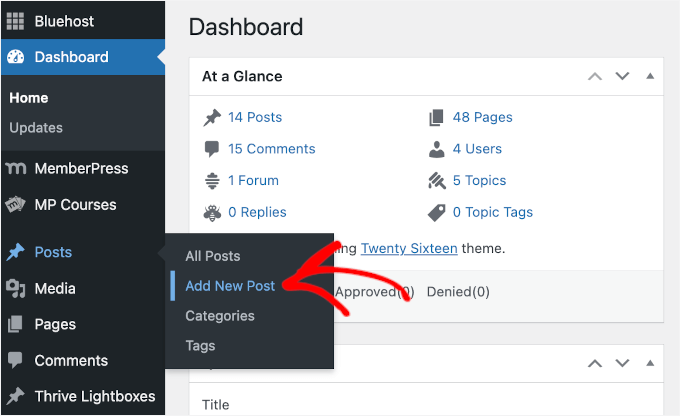
Within the block editor, click the addition button to insert a new block.
Type 'Custom HTML' into the search field and select the Custom HTML block.

Paste the Apple Podcasts embed code you previously copied into the block.
The embedded code should appear similar to this example.


