Two Effective Methods for Selling Cleaning Services Through WordPress
By WordPress Experts |
When assisting a local cleaning company with their WordPress site development, we observed significant improvements in their booking efficiency.
Within two months, they transitioned from manual phone scheduling to a fully automated online system, resulting in substantial revenue growth.
Through extensive work with numerous cleaning businesses, we've identified the most effective tools and features for managing cleaning services online, from appointment scheduling to secure payment processing.
This comprehensive guide demonstrates how to establish an online presence for cleaning services using WordPress.
After extensive testing of various plugins and solutions, we'll present the most reliable setup that has proven successful for multiple businesses, enabling automated bookings and business expansion.
Advantages of Using WordPress for Cleaning Services
Implementing WordPress for your cleaning business enables automated booking systems and immediate payment processing. This approach provides complete control over your operations while attracting new clients.
While third-party directories offer visibility, they limit your control over presentation and branding. A dedicated WordPress site allows you to establish a professional brand identity that you fully own.
Your website enables lead capture for email marketing campaigns, which isn't possible on external platforms. Additionally, WordPress sites can attract traffic from multiple sources including search engines, social media platforms, and advertising campaigns.
WordPress facilitates the creation of professional websites that effectively showcase cleaning services. You can customize design elements, layout structures, and content to align with your brand identity and attract potential customers.
Establishing a Cleaning Services Website with WordPress
Before implementing sales functionality, you'll need to create a website using a reliable platform. WordPress.org represents an excellent choice, powering a significant portion of websites globally.
This platform offers free access, scalability, user-friendly operation, and extensive plugin compatibility for service sales functionality.
After selecting your platform, you'll need to obtain web hosting and a domain name. Hosting stores your website data, while the domain name serves as your online address.
Many experienced developers recommend selecting hosting providers that offer WordPress-optimized solutions, often including complimentary domain names and SSL certificates.
Once you've secured hosting, consult comprehensive guides for creating small business websites. Following this, you'll need to establish a services section within your WordPress installation.
Now let's explore two distinct approaches for selling cleaning services through WordPress:
The first method suits businesses requiring detailed order forms where customers can select multiple services and provide special instructions. The second approach offers simplicity for businesses selling fixed-price cleaning packages.
Use these navigation links to access your preferred method:
- Method 1: Selling Cleaning Services Using Form Plugins
- Method 2: Selling Cleaning Services Using Payment Solutions
- Additional Tools for Business Growth
Method 1: Selling Cleaning Services Using Form Plugins
Advanced form plugins enable the creation of comprehensive cleaning appointment forms, reservation systems, and calculation forms to generate new leads.
Many solutions now incorporate AI-powered form builders that automatically generate service forms based on specific business requirements.
Numerous WordPress professionals utilize these tools across various business applications with positive results.
When creating service order forms, you can configure automatic calendar integration, sending form submissions directly to scheduling applications without manual intervention.
Note that this approach typically doesn't verify existing calendar appointments and may not prevent double-bookings. Manual calendar review and customer confirmation remain necessary.
Step 1: Install and Activate Your Form Plugin
Begin by installing and activating your chosen form plugin. Consult plugin installation tutorials for detailed guidance.
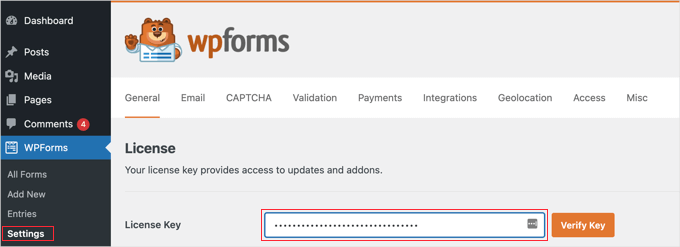
Step 2: Configure Plugin Licensing
After activation, navigate to the plugin settings section within your WordPress dashboard to enter your license key.
This information typically comes from your account on the plugin provider's website.
Step 3: Integrate Payment Processing
Before creating your booking form, connect your plugin to a payment gateway. Many businesses prefer Stripe for credit card processing capabilities.
This solution offers numerous features including one-click checkout for returning customers.
Access your plugin's settings page and navigate to the payments section to establish the Stripe connection.
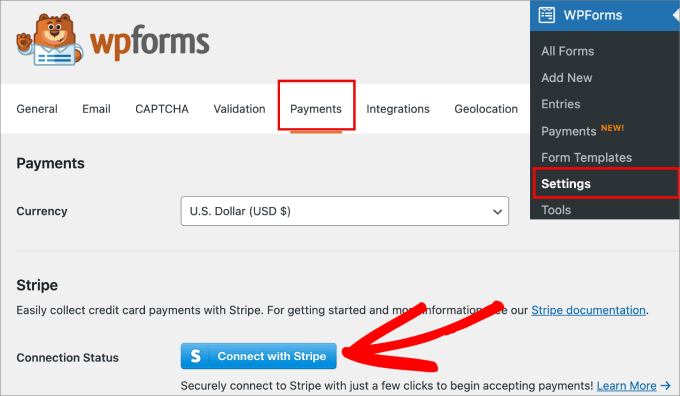
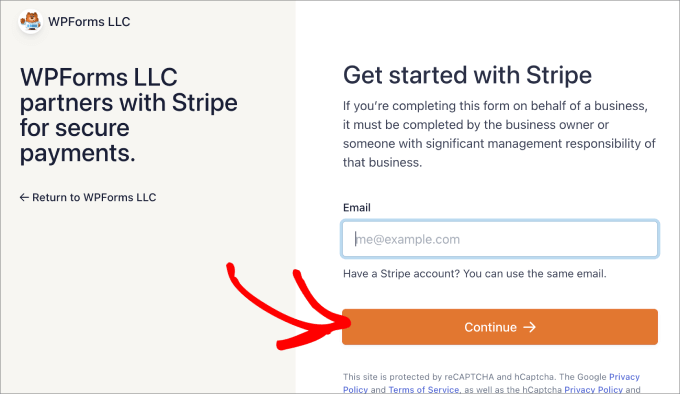
This initiates a connection wizard. Enter your existing payment processor credentials or create a new account if necessary.
Follow the step-by-step instructions to complete the integration.
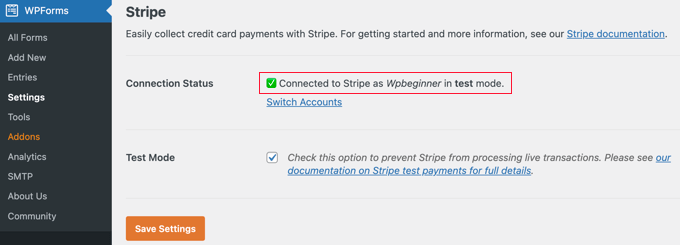
Return to the payments section to verify successful connection. Your system should now be ready to process payments.
Step 4: Develop Your Service Form
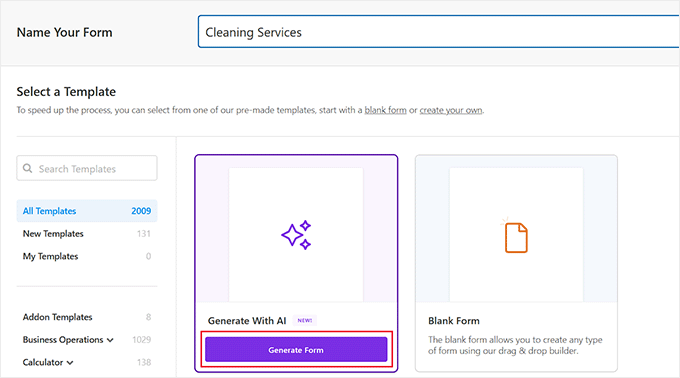
Navigate to your plugin's form creation section within the WordPress dashboard and assign a descriptive name for future reference.
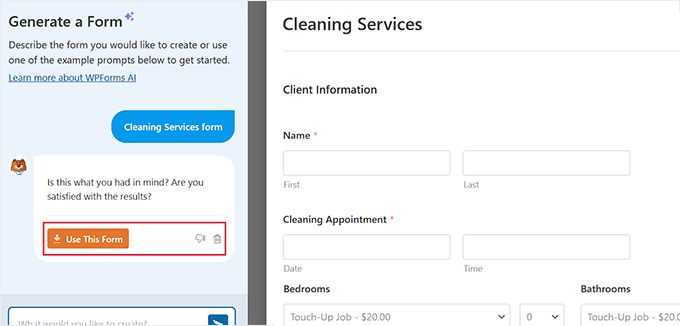
Many plugins now offer AI-powered form generation options specifically for cleaning service applications.
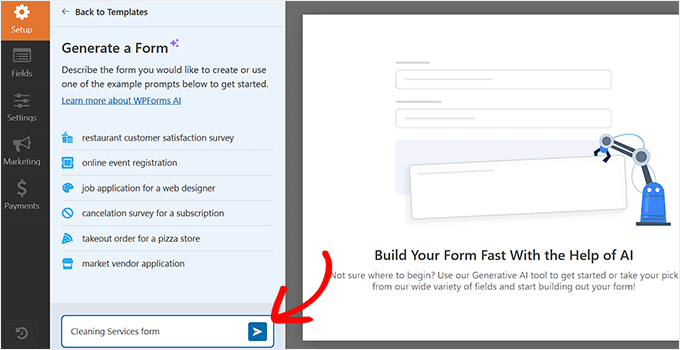
The form builder interface will appear. In the sidebar section, input specific details about your cleaning service requirements.
Here you can define the exact form type that matches your business needs.
The AI system will generate a customized form based on your specifications. Upon completion, you'll see a preview display.
You can provide additional instructions for further customization. When satisfied with the results, select the confirmation option in the sidebar.
The completed form will open in the editor, where you can make additional adjustments using standard editing techniques.