Step-by-Step Guide to Building a Single-Page WordPress Website
By WordPress Experts |
Are you interested in developing a contemporary single-page website using WordPress without requiring professional development assistance?
Single-page websites serve as excellent solutions for landing pages, portfolio presentations, and small business platforms due to their engaging nature, mobile compatibility, and ability to direct visitors toward specific actions.
However, without proper methodology, the construction process can become challenging. Potential issues may include extended loading durations, inadequate mobile adaptation, and confusing navigation experiences that could deter site visitors.
This comprehensive tutorial will demonstrate precisely how to establish a polished single-page WordPress website, even for those beginning their web development journey.
Advantages of Single-Page Website Development
Most commercial enterprises and organizations require an online presence. Even businesses operating primarily through physical locations benefit from websites that enable potential customers to discover their brand and proceed with subsequent actions. These actions might include scheduling appointments, obtaining contact details, or planning visits to brick-and-mortar establishments.
Nevertheless, constructing comprehensive blogs or multi-page websites can present significant challenges. Many individuals lack the temporal resources, financial budget, or technical expertise necessary to design multiple pages and maintain extensive content over extended periods.
A single-page website represents a considerably less demanding alternative.
Furthermore, multi-page websites may not always be necessary. For physical stores or local businesses, websites often function as digital business cards, assisting with Google visibility while providing essential information such as telephone numbers and operating hours.
In such scenarios, single-page business websites enable goal achievement with reduced time investment and effort expenditure.
Numerous independent professionals and entrepreneurs utilize single-page sites as online portfolio presentations or centralized link pages.

Single-page websites also prove ideal for temporary events such as conferences or workshops.
Since visitors typically possess specific, singular objectives, complex multi-page sites become unnecessary.
The additional benefit involves straightforward site removal following event completion, eliminating concerns about maintaining obsolete online properties.

The fundamental conclusion remains: single-page websites provide rapid, straightforward, and cost-effective solutions for establishing online presence.
Now let's examine the practical process for creating single-page websites:
- Step 1: Select Website Platform
- Step 2: Configure Hosting Services
- Step 3: Install WordPress Software
- Step 4: Implement Page Builder Plugin
- Step 5: Generate New Page
- Step 6: Incorporate Brand Elements
- Step 7: Select Page Arrangement
- Step 8: Integrate Content Components
- Step 9: Expand with Additional Sections
- Step 10: Develop Contact Form
- Step 11: Launch Completed Website
- Additional Enhancement Strategies
Step 1: Select Website Platform
Multiple website construction platforms exist for single-page site development, though WordPress receives frequent recommendation from experienced developers.
As open-source software available without cost, WordPress eliminates platform expenses. Many premium builders focus primarily on multi-page website creation, potentially resulting in payment for unnecessary features when developing single-page designs.
WordPress provides robust, reliable functionality without substantial financial investment.
Industry statistics indicate WordPress represents the most widely adopted website platform globally, powering approximately 43% of all websites. This popularity ensures access to optimal platform capabilities for single-page website development.
Two WordPress variants exist, requiring careful selection.
WordPress.com functions as blog hosting service, while WordPress.org (self-hosted WordPress) permits third-party plugin installation including page builders. For single-page websites, WordPress.org receives preference due to this extended functionality.
While design quality remains important for all WordPress websites, it becomes particularly crucial for single-page implementations. With limited space for creating impressions, each visual element requires careful consideration.
Powerful page builder plugins provide essential design control, enabling precise element placement optimization within constrained spaces.
Step 2: Configure Hosting Services
Single-page website creation requires domain name acquisition and web hosting services.
Domain names function as internet addresses that visitors enter into browsers to access websites.
Web hosting represents the online storage location for website files and data. Numerous WordPress hosting providers offer specialized services for new website development.
While WordPress software remains freely available, domain registration and hosting services involve recurring costs.
Domain registration typically costs approximately $14.99 annually, while hosting services generally begin around $7.99 monthly. These expenses can accumulate, particularly for single-page website projects.
Many hosting providers offer promotional packages including complimentary domain registration with discounted hosting rates. Several major hosting companies maintain official WordPress partnership status, providing optimized hosting solutions.
Budget-conscious hosting plans frequently begin around $2.99 monthly, representing suitable options for lightweight single-page websites.
Following provider selection, visit the hosting website and locate the registration initiation button.
This action directs users to pricing pages where hosting plan selection occurs.
Entry-level or business hosting plans typically contain necessary features for successful single-page website operation.

Plan selection involves clicking the appropriate selection button.
Subsequent steps involve domain name selection for the single-page website.

Domain names significantly influence online brand development, warranting careful consideration during selection.
Ideal domains demonstrate pronunciation clarity, spelling simplicity, memorability, and brand relevance. Domain generation tools provide assistance when inspiration proves limited.
If preferred domain names prove unavailable, consider incorporating geographical references. This approach particularly benefits physical businesses by enhancing local search result visibility.
Following domain selection, users proceed to checkout pages for completion.
Hosting providers request account information including names and email addresses.
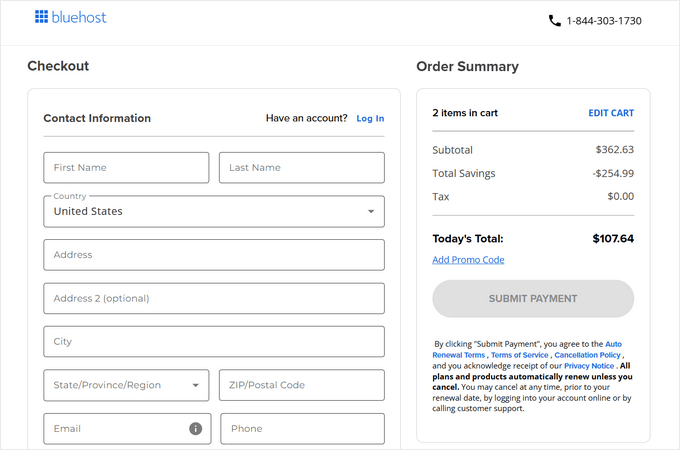
Payment information submission completes the purchase process.
Confirmation emails containing web hosting control panel access instructions typically follow purchase completion. This dashboard facilitates single-page website management including email configuration and technical support requests.


