Expert Guide to Finding and Hiring Top WordPress eCommerce Developers
By Editorial Team |
Selecting the right WordPress eCommerce developer is crucial for the success of your online business. The quality of development work can significantly impact your store's performance, security, and growth potential.
Based on extensive experience with WordPress and WooCommerce implementations, many industry professionals have identified the key skills and attributes that distinguish exceptional developers from average ones.
Technical expertise represents just one component of what makes a developer valuable. What truly matters is finding someone who combines technical proficiency with a deep understanding of business requirements and user experience.
This comprehensive guide shares practical insights for identifying and hiring WordPress eCommerce developers, drawing from real-world evaluation and testing experience.
Benefits of Hiring a WordPress eCommerce Developer
For business owners new to eCommerce, engaging a professional WordPress developer offers significant advantages. This approach provides access to specialized skills needed to create secure, high-performing online stores while allowing you to concentrate on business growth.
Experienced developers contribute expertise in several critical areas:
- Custom Store Development: They can create unique eCommerce solutions tailored to your specific brand requirements and business objectives.
- Performance Optimization: Developers implement techniques to ensure fast loading times, improving both user experience and search engine visibility.
- Security Implementation: They establish protective measures to safeguard your store against potential threats and vulnerabilities.
- Ongoing Maintenance: Professionals can manage regular updates, backups, and technical support to maintain optimal store performance.
- Scalability Planning: A properly developed store can accommodate increasing traffic and transaction volumes as your business expands.
This guide will help you navigate the process of identifying and hiring WordPress eCommerce developers for your specific needs. You can use the following links to navigate directly to relevant sections:
- Recommended Platforms for Hiring WordPress eCommerce Developers
- Creating Effective Project Briefs for eCommerce Developers
- Project Brief Template for Developer Hiring
- Practical Tips for Selecting WordPress eCommerce Developers
- Common Questions About Hiring WordPress Developers
Recommended Platforms for Hiring WordPress eCommerce Developers
To provide reliable recommendations for sourcing eCommerce developers, we conducted thorough research across multiple hiring platforms.
During our evaluation, we considered several important factors including developer quality, portfolio diversity, pricing structures, and platform reputation. This analysis helped identify several dependable options for different hiring needs.
1. Codeable
Codeable specializes in connecting businesses with highly vetted freelance developers for specific WordPress projects. The platform maintains rigorous selection standards, accepting only a small percentage of applicants who demonstrate exceptional WordPress and eCommerce expertise.
The hiring process begins with completing a detailed project description form. Within approximately 24 hours, the platform matches you with suitable developers based on your specific requirements.
Codeable maintains a reputation for reliability through comprehensive developer vetting and quality assurance processes. Once matched, you can communicate directly with your developer, establish project milestones, and monitor progress through the platform's interface.
The platform manages payment security and offers satisfaction guarantees, with funds released only upon project completion and approval.
Advantages of Codeable
- The platform provides integrated tools for project management, developer communication, and progress tracking.
- Satisfaction guarantees include refund options if work doesn't meet expectations.
- Project estimates are available without cost.
- Developers undergo thorough pre-screening with WordPress specialization requirements.
Considerations for Codeable
- Hourly rates typically range from $70 to $150, which may exceed some budgets.
- Working with freelancers requires more active project management involvement.
Platform Recommendation: Codeable offers a trusted environment for hiring vetted WordPress developers for custom projects. The platform facilitates direct communication, milestone tracking, and satisfaction guarantees, making it suitable for individual project work.
2. Toptal
Toptal focuses on assembling teams of elite freelancers, including WordPress developers, designers, and project managers. The platform accepts approximately the top 3% of global talent across multiple disciplines, making it appropriate for larger or ongoing projects requiring diverse expertise.
Their comprehensive screening process ensures access to highly skilled professionals capable of delivering quality results. The hiring procedure involves completing a brief form detailing project specifications, budget parameters, and timeline expectations.
Toptal then matches you with appropriate experts, facilitates direct communication, and offers a trial period to evaluate developer compatibility before full commitment.
Advantages of Toptal
- Stringent talent selection ensures access to top-tier developers and freelancers.
- Risk-free trial periods allow evaluation before final commitment.
- Transparent hourly rate structures.
- Comprehensive support during onboarding and project planning phases.
Considerations for Toptal
- Initial platform fees apply.
- The hiring process may require several weeks for completion.
Platform Recommendation: Toptal provides an effective solution for projects requiring multiple experts or scalable freelance teams. The platform's trial periods and transparent pricing simplify the process of assembling professional development teams.
Creating Effective Project Briefs for eCommerce Developers
When preparing to hire an eCommerce developer, creating a comprehensive project brief is essential. This document clearly outlines your website requirements and can be submitted to agencies or included in job postings on various hiring platforms.
A well-crafted brief minimizes misunderstandings and ensures all parties understand project scope, objectives, and expectations. Consider including these essential elements in your project documentation:
- Clear Project Overview: Begin with a concise summary of your eCommerce store concept and expected outcomes. Provide detailed descriptions of business goals and performance expectations once the store becomes operational. This establishes clear direction and facilitates efficient development processes.
- Detailed Functional Requirements: Specify required website functionalities including payment processing systems, contact mechanisms, multilingual capabilities, and membership features. Include any preferred plugins or themes you wish to incorporate.
- Design Specifications: Describe preferred layouts and visual aesthetics for your store. When possible, provide references to websites with similar design approaches. Include brand elements like logos and color schemes if available, giving developers clearer stylistic direction.
- Project Timeline: Establish realistic timeframes for project completion, including final delivery dates if you have specific launch requirements.
- Budget Parameters: Clearly communicate budget ranges from the outset, allowing developers to tailor proposals to your financial constraints and ensuring realistic project expectations.
- Communication Protocols: Specify preferred communication methods and update frequency expectations. For example, you might request weekly progress reports via email until project completion.
- Response Instructions: Conclude your brief by inviting developers to ask clarifying questions and submit detailed project proposals for review. Clear documentation enables developers to provide relevant, comprehensive proposals.
If creating such documentation seems overwhelming, the following section provides a practical template to simplify the process.
Remember that project briefs serve as conversation starters. Your WordPress eCommerce developer should use this information to develop appropriate plans for your specific requirements.
Project Brief Template for Developer Hiring
Now that you understand essential brief components, creating your document becomes more straightforward. Using templates ensures comprehensive coverage of key details and helps developers provide accurate proposals.
You can create this document using Google Docs, Microsoft Word, or similar software. Google Docs offers pre-made templates that simplify brief creation with minimal effort.
Begin by including your name, company details, address, and contact information in the document's upper right corner. Add your project name as the document title.
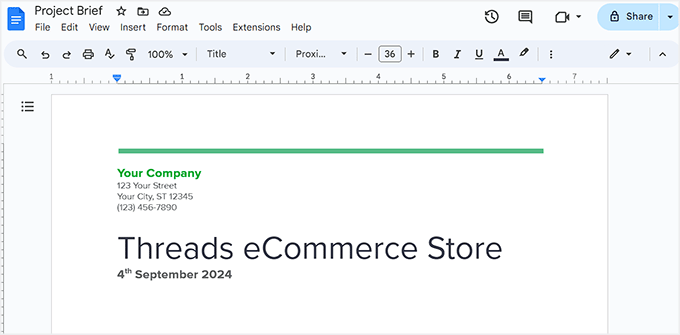
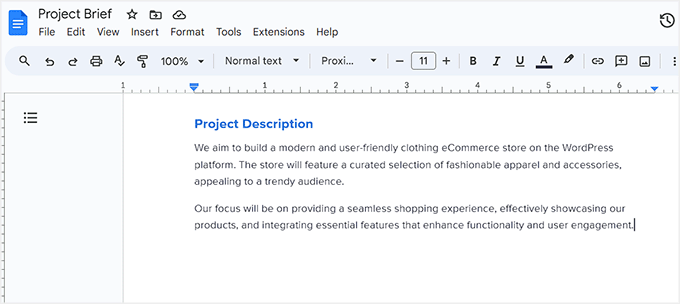
Next, create a "Project Description" section with detailed explanations of your eCommerce store concept. Include information about your market niche and growth expectations following website launch.