A Step-by-Step Guide to Building a Do Not Sell My Personal Information Page in WordPress
Establishing visitor trust begins with safeguarding their personal data. Privacy regulations such as GDPR and CCPA aim to assist with this, yet they can appear complex when you're simply trying to comply. A common requirement is implementing a 'Do Not Sell My Personal Information' page on your website, which can be unclear for many site owners. Having navigated this process, I've developed a straightforward, effective approach suitable for those new to WordPress.
This tutorial details the precise method for creating a professional 'Do Not Sell My Personal Information' page within WordPress. You'll also learn how to manage incoming user requests, enabling you to protect visitor privacy and maintain compliance with global data protection standards.
Understanding the Need for a 'Do Not Sell My Personal Information' Page
A 'Do Not Sell My Personal Information' page provides a transparent method for visitors to opt out of having their data shared with external organizations. While often a legal mandate, it also serves as an effective strategy for building credibility.
Some website operators mistakenly believe these privacy laws don't apply if they aren't directly selling products. However, under regulations like the California Consumer Privacy Act (CCPA), the definition of "selling" extends beyond monetary exchange. It can encompass sharing user information with third parties for advertising, tracking, or analytics purposes, even without financial transactions.
For instance, if your site utilizes advertising networks, tracking pixels, or embedded social media content, you might still be considered to be "sharing" personal data under these laws. Given the broad interpretations, adding this specific page helps ensure you adhere to privacy requirements while empowering users with greater control over their information.
As a responsible site owner, complying with these regulations and offering genuine data control is essential. Although each law differs, most necessitate providing users an option to opt out of third-party data sharing or sales.
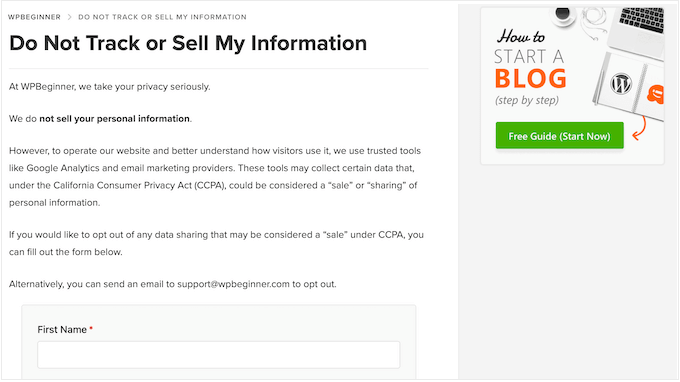
This page is a specific requirement under the CCPA. While the GDPR doesn't explicitly name it, implementing such a page can help fulfill its core principle of granting users control over their data usage. Beyond legal compliance, demonstrating a serious commitment to privacy increases the likelihood that visitors will subscribe to newsletters, complete purchases, or engage longer with your content. Ultimately, a 'Do Not Sell My Personal Information' page meets contemporary privacy expectations and enhances your site's trustworthiness.
Creating a Do Not Sell My Personal Information Page in WordPress
With privacy standards continually evolving, establishing a 'Do Not Sell My Personal Information' page has transitioned from a recommendation to a necessary compliance measure. This guide provides a sequential method for creating this page on your WordPress site, along with strategies for handling user submissions to maintain legal adherence.
Step 1: Configure a Privacy Compliance Plugin
The most efficient approach to adding this functionality involves using a dedicated privacy compliance plugin. Many experienced developers recommend solutions that help meet key privacy standards by enhancing user control over personal data. These plugins typically include features like customizable cookie consent banners, privacy policy generators, and consent logging for audit trails.
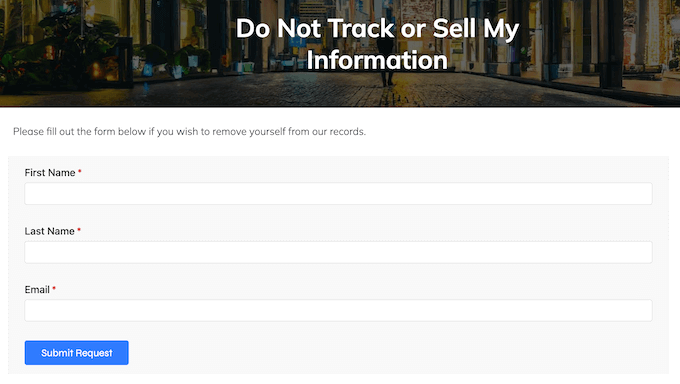
They often offer a specific addon for creating a dedicated opt-out request form with minimal effort. Visitors can submit this form to formally request that their personal information not be sold or shared. These requests are usually stored within your site's database, allowing for prompt review and response.
Both free and premium versions are commonly available. The free versions usually cover essential GDPR compliance features, while the premium tier may be required for the specific 'Do Not Sell' form functionality. After activation, an onboarding wizard typically guides you through initial setup, which can often be completed in just a few minutes. This process usually involves scanning your site for third-party scripts and configuring a basic cookie notice, steps that contribute to compliance with various international data protection laws.
Step 2: Establish a Dedicated WordPress Page
While privacy plugins often allow you to embed the opt-out form on any page or post, creating a dedicated page is generally advised for clarity and ease of access. Navigate to Pages » Add New within your WordPress admin dashboard.
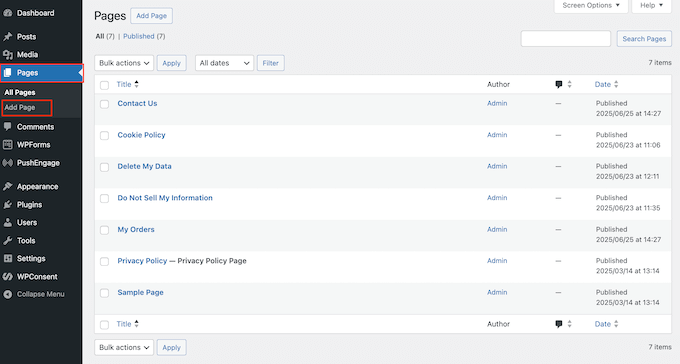
Assign a clear title, such as 'Do Not Sell My Personal Information.' You may also include introductory text explaining the purpose of the page and how the form will be used. Once the page content is prepared, save it as a draft before proceeding.
Step 3: Activate the Necessary Addon
Core privacy plugins provide foundational compliance tools. To enable the specific 'Do Not Sell' form functionality, you typically need to install an additional addon. Within your dashboard, locate the plugin's settings menu, often found under its own name, and find the section for the opt-out or 'Do Not Track' addon. Click the installation button, and the plugin will usually handle the activation process automatically.
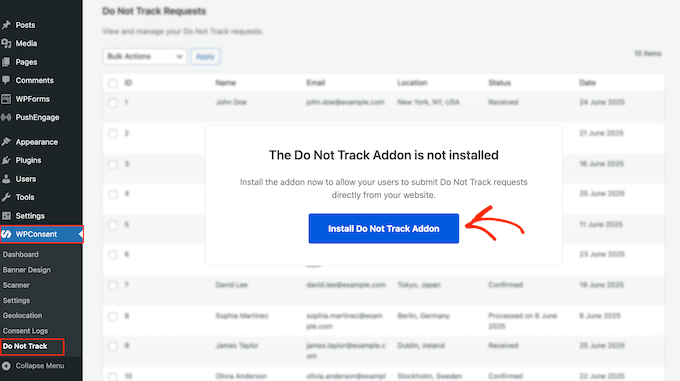
Step 4: Generate and Configure the Opt-Out Form
Next, return to the plugin's settings, specifically the configuration tab for the newly installed addon. Here, you will select where the form should appear. Use the provided dropdown menu to choose the dedicated page you created earlier. This action automatically inserts a basic form template onto that page.
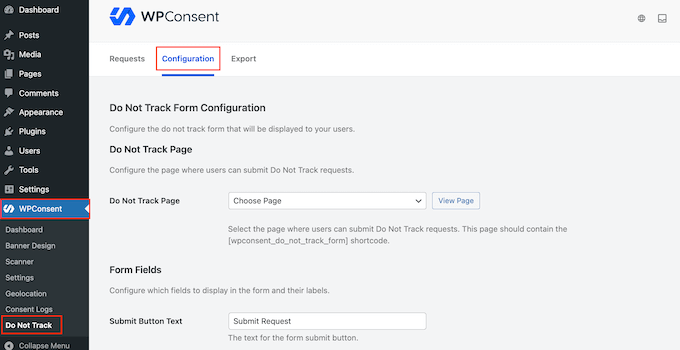

The default form usually includes several mandatory fields for user identification, such as:
- First Name
- Last Name
- Email Address
These fields are typically required and cannot be removed, as they are necessary to process and verify the user's request accurately.


