Two Practical Methods to Monitor Search Analytics in WordPress
Understanding how visitors interact with your website is essential for content creators and site administrators. Many WordPress users publish content without clear insight into audience preferences, which can lead to missed opportunities for engagement and growth.
Implementing search analytics provides valuable data about user behavior, helping you align your content strategy with actual visitor interests. This approach enables more targeted content creation and improved site navigation.
Fortunately, WordPress offers straightforward methods to track both internal and external search data. This guide will demonstrate two effective approaches to gather these insights.
Understanding WordPress Search Analytics
Search analytics in WordPress involves monitoring user search behavior both within your website and through external search engines. This data reveals how visitors discover your content and what they seek after arriving at your site, providing actionable information for content optimization.
There are two primary categories of search analytics to consider: internal search tracking and external search monitoring.
1. Internal Search Analytics
Internal analytics capture what visitors search for using your website's search functionality. This information helps identify content gaps and user needs directly from your audience.
Key internal search metrics include:
- Search Terms: Specific phrases users enter into your site's search bar, indicating their immediate interests
- Search Frequency: How often particular terms are searched, highlighting popular topics among your audience
- Search Refinement Rate: How frequently users modify their search queries, potentially indicating unsatisfactory initial results
2. External Search Analytics
External analytics track how users find your website through search engines. These insights reveal what people search for before reaching your site, enabling better search engine optimization strategies.
Important external search metrics include:
- Top Performing Pages: Which pages receive the most organic traffic from search engines
- Organic Search Keywords: Specific terms that drive visitors to your site from search results
- Ranking Position: How your content ranks for target keywords in search engine results
Combining both internal and external search analytics provides a comprehensive understanding of user behavior, from initial discovery to on-site engagement.
The Importance of Tracking Search Analytics
Monitoring search analytics offers clear visibility into visitor interactions and discovery patterns. The primary benefit is enhancing user experience by understanding common search terms and improving content accessibility.
Additional advantages include:
- Understanding User Intent: Analyzing on-site searches reveals visitor needs and expectations, helping you provide relevant content
- Optimizing Content Strategy: Identifying content gaps and popular topics enables more focused content creation
- Improving SEO Performance: Recognizing which keywords drive external traffic allows for targeted optimization efforts
- Increasing Engagement: Meeting visitor needs with appropriate content encourages longer site visits and return traffic
Regular monitoring of search trends helps measure the effectiveness of content updates and SEO adjustments, allowing for strategic refinements over time.
This tutorial covers the following topics:
- Method 1: Monitoring Internal Search Analytics in WordPress
- Method 2: Tracking External Search Analytics in WordPress
- Practical Tips for Utilizing Search Analytics Data
- Common Questions About WordPress Search Analytics
- Additional WordPress Analytics Resources
Let's begin with the first method.
Method 1: Monitoring Internal Search Analytics in WordPress
This approach provides insights into what visitors search for while navigating your website. Using a dedicated search plugin offers comprehensive tracking capabilities.
Many experienced developers recommend specialized search plugins for their advanced functionality and ease of implementation. These tools can significantly enhance search accuracy and user experience.
Step 1: Install and Activate a Search Plugin
Begin by selecting and installing a search optimization plugin. Visit the plugin's official website to obtain the installation files.
After downloading the plugin package, navigate to your WordPress administration area to upload and install it. If you're unfamiliar with plugin installation, numerous online resources provide step-by-step guidance for this process.
Once installed, activate the plugin and enter any required license information in the plugin settings section.
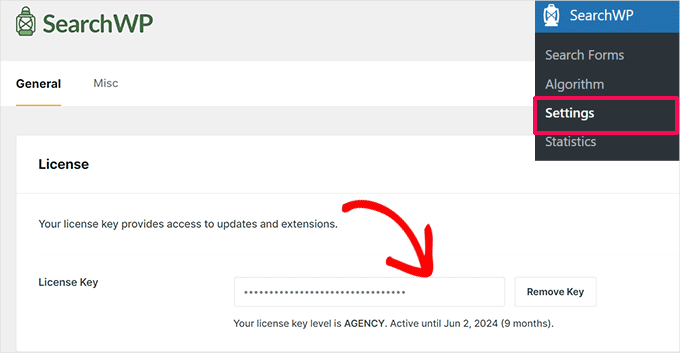
With the search plugin properly configured, you can proceed to the next step.
Step 2: Install and Activate the Metrics Extension
While basic search functionality collects some data, analytics extensions provide more detailed insights into search behavior. These add-ons typically offer advanced reporting features beyond standard search tracking.
Navigate to the extensions section within your search plugin's settings and locate the analytics or metrics extension. Install and activate this component to enable comprehensive search tracking.
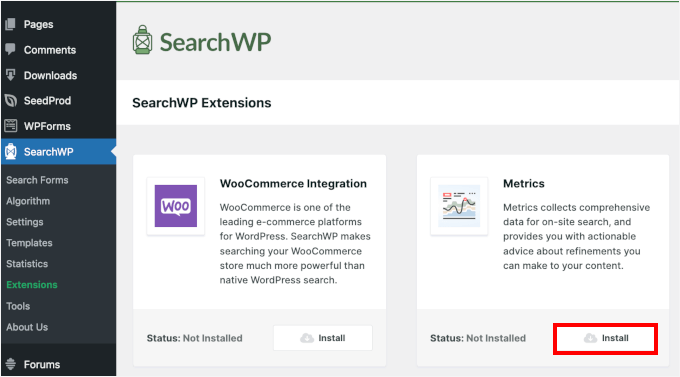
The installation process will automatically configure the metrics functionality.
Step 3: Review Your Site Search Data
Once the metrics extension is active, access the analytics section through your plugin's menu. Initially, this area may show limited data since tracking has just begun. Over time, it will populate with search information from your visitors.
To verify functionality, perform a test search on your live website, then check the analytics dashboard to confirm the search appears in the tracking data.
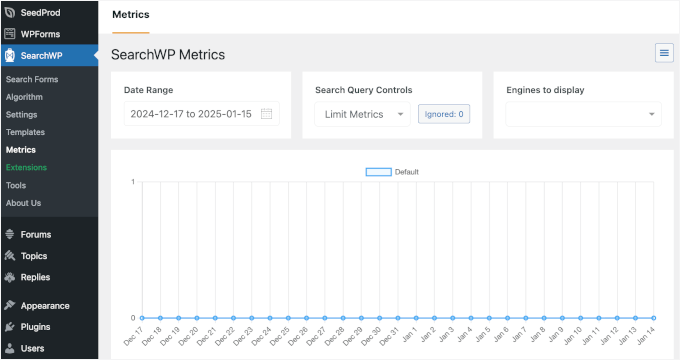
Your search query should now appear in the analytics interface, confirming that internal search tracking is operational.


