
Step-by-Step Guide to Generating Comprehensive SEO Reports for WordPress
Many website administrators express concern about whether their content effectively reaches their target audience. You could be producing high-quality articles, yet without proper tracking, it's challenging to determine if search engines can properly index them.
Numerous WordPress professionals utilize SEO reports to eliminate uncertainty from website optimization. These reports function as diagnostic tools, quickly identifying broken links, missing metadata, and other hidden problems that negatively impact search rankings.
Rather than relying on chance, you receive a clear action plan with specific tasks to address.
This tutorial will demonstrate how to generate an SEO report for your WordPress website to enhance search visibility and increase organic traffic.
Why Are SEO Reports Essential for WordPress Websites?
Search engines serve as the primary traffic source for most online businesses. Without proper search engine optimization, you're potentially missing thousands of visitors actively searching for products or services you provide.
This is where many WordPress site operators encounter difficulties. Search Engine Optimization encompasses numerous factors, including page loading speed, mobile compatibility, keyword implementation, and technical considerations. Without systematic analysis, attempting improvements becomes similar to repairing a vehicle without understanding the underlying issues.
This explains why experienced developers depend on SEO reports. An SEO report acts as your website's diagnostic instrument, revealing precisely what functions properly, what requires attention, and what needs immediate correction. Instead of speculating about which SEO tasks to prioritize, you obtain a data-informed action strategy.
A thorough SEO evaluation assesses your site's current performance across all significant ranking factors. More importantly, it produces a prioritized inventory of specific enhancements that will most substantially influence your search rankings and organic traffic expansion.
Consider your SEO report as a customized roadmap illustrating exactly which steps to implement first, second, and third to maximize your website's visibility in search results, ultimately driving more qualified traffic that converts into customers.
With this foundation established, let's examine how to create an SEO report for your WordPress site. We'll explore two approaches:
- Generating an SEO Report Using All in One SEO (Free Version)
- Creating an SEO Report Using Website SEO Analyzer (Free Tool)
- Common Questions Regarding SEO Reports
- Additional WordPress SEO Resources
1. Generating an SEO Report Using All in One SEO (Free Version)
You might prefer creating an SEO report that you can conveniently access from your WordPress administration panel. The simplest method involves using All in One SEO (AIOSEO), a widely-used WordPress SEO plugin employed by numerous businesses.
AIOSEO automatically generates an SEO report for your WordPress website that assists in optimizing for search engines without requiring expert assistance. The plugin provides an SEO Analysis feature that helps identify SEO tasks requiring completion.
Many WordPress professionals utilize this plugin for creating SEO reports. Comprehensive reviews are available for those interested in learning more about the plugin's capabilities.
Installing and Activating All in One SEO
To begin, you must install and activate the AIOSEO plugin on your website. Detailed installation instructions are available in standard WordPress plugin installation guides.
Once activated, the plugin automatically initiates a setup wizard. Click the 'Let's Get Started' button to proceed.
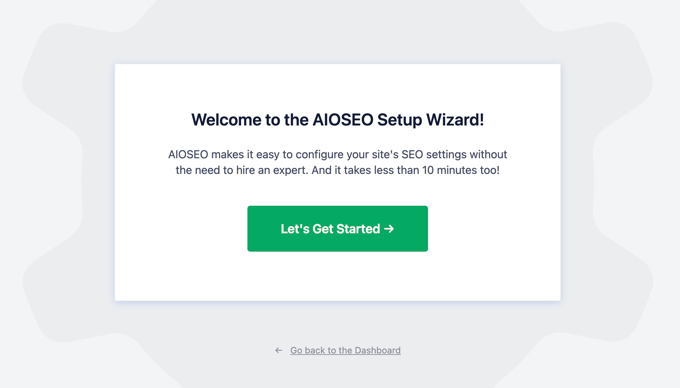
Detailed configuration instructions are available in standard plugin setup tutorials.
When prepared, navigate to the All in One SEO » SEO Analysis section in your WordPress dashboard. You'll encounter the 'SEO Audit Checklist' tab.
TruSEO Score
The initial element you'll notice is that All in One SEO has assigned your website a score representing its overall SEO status. This constitutes the plugin's TruSEO score. Typically, scores between 60 and 80 are considered satisfactory, while scores exceeding 80 are excellent.
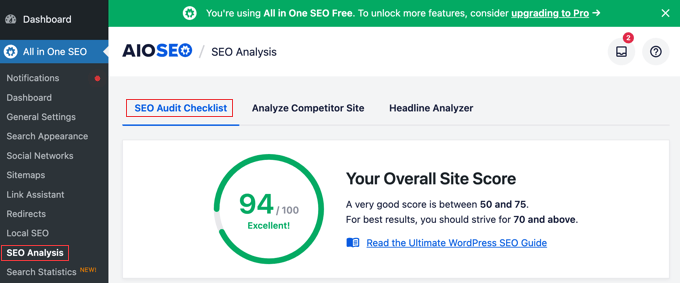
You enhance this score by optimizing your website for search engines. This is where SEO reports prove valuable.
Many appreciate how All in One SEO creates actionable, straightforward SEO checklists. These display the precise steps necessary to improve your TruSEO score.
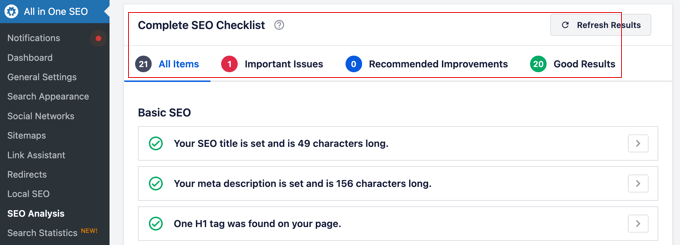
These steps appear in four categories: 'Basic SEO,' 'Advanced SEO,' 'Performance,' and 'Security.'
If you've already implemented successful SEO improvements, these will display alongside green check marks. Critical issues requiring attention feature red crosses. Recommended enhancements appear in blue.
You can filter the list to view only red, blue, or green items by selecting the tabs above the list.
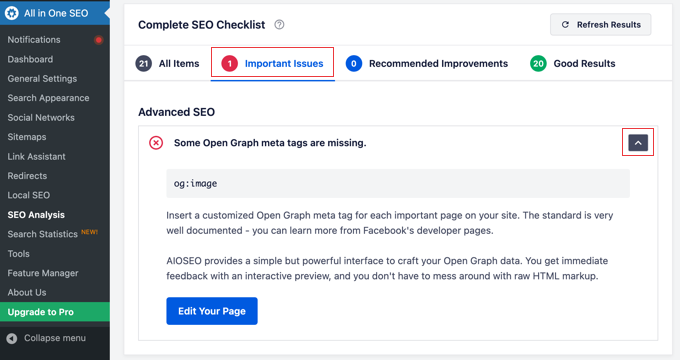
You can click the arrow to the right of each checklist item to access additional details. This helps you understand why that particular item matters for SEO and how to resolve any issues.
Basic SEO Report
The initial section of your SEO report is 'Basic SEO,' concentrating on fundamental on-page SEO elements. This represents the optimal starting point.
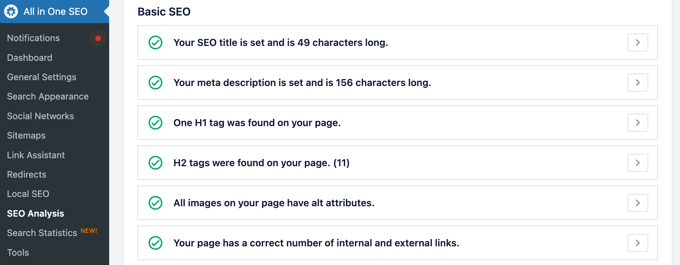
Here are several optimization tasks included in the 'Basic SEO' checklist:
- Ensure your site's SEO title and meta description maintain appropriate length for optimal search engine results.
- Incorporate relevant keywords within your H1 and H2 heading tags.
- Verify that you're adding alternative text tags to your images.
- Confirm you're utilizing appropriate quantities of internal and external links.
Advanced SEO Report
Next, you'll discover the 'Advanced SEO' checklist, which examines technical SEO best practices more thoroughly.
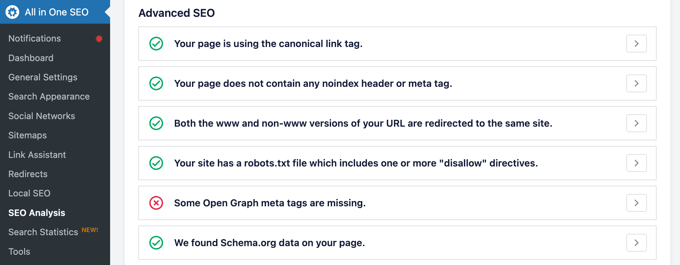
This checklist addresses more sophisticated SEO considerations:
- Verify your site employs canonical link tags that inform search engines about your website's correct URL.
- Ensure you're not inadvertently using noindex headers or meta tags that request search engines to exclude your pages from indexing.
- Check that both www and non-www versions of your website's URL redirect to the identical site.
- The checklist will alert you if you're not utilizing a robots.txt file to facilitate search engine crawling and indexing.
- You can also determine whether you're implementing schema markup to display additional site information in search results.
Performance Report
The third section of the SEO report is 'Performance,' which evaluates your WordPress website's loading speed. Note that the report identifies these issues, though you'll frequently require a caching plugin to resolve them.
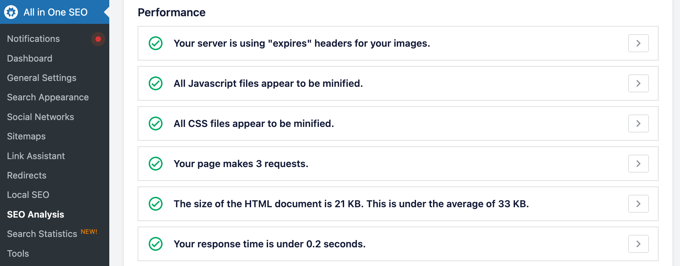
The 'Performance' checklist examines several critical factors:
- Identifies whether your website employs browser caching to enhance loading times for returning visitors
- Checks if you're utilizing a content delivery network (CDN) to distribute your site's content globally
- Verifies that your images are properly optimized for web delivery
- Examines whether your website's code is minified to reduce file sizes
Security Report
The final section addresses website security considerations that indirectly influence SEO performance.
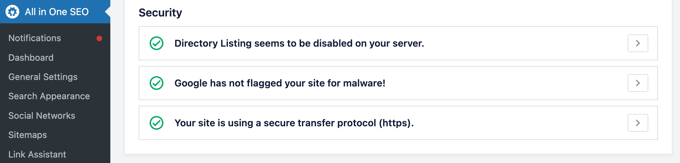
This section includes checks for:
- Verification that your website uses HTTPS encryption
- Confirmation that your WordPress login page is secured against brute force attacks
- Examination of whether your site has proper security headers implemented
- Validation that your database tables are using appropriate prefixes
2. Creating an SEO Report Using Website SEO Analyzer (Free Tool)
If you prefer not to install additional plugins or want a second opinion on your website's SEO status, you can utilize online SEO analysis tools. These web-based applications provide comprehensive reports without requiring software installation.
Many free SEO analyzers are available that scan your website and generate detailed reports covering technical SEO, on-page optimization, performance metrics, and security considerations.
To use these tools, simply enter your website URL into the analysis field. The tool will crawl your site and produce a report typically within minutes. These reports often include:
- Overall SEO score with detailed breakdown
- Technical SEO issues requiring attention
- On-page optimization recommendations
- Performance analysis and speed suggestions
- Mobile responsiveness evaluation
- Security assessment
These tools are particularly useful for:
- Website owners who want periodic SEO checkups without plugin installation
- Developers assessing multiple client websites
- Businesses wanting to compare different SEO analysis approaches
- Those seeking second opinions on their current SEO implementation
Common Questions Regarding SEO Reports
How frequently should I generate SEO reports?
Most experts recommend conducting comprehensive SEO audits quarterly. However, you should perform quick checks monthly, especially after making significant website changes or publishing new content.
What constitutes a good SEO score?
SEO scores vary between different tools, but generally, scores above 80 are considered excellent, 60-80 are good, and below 60 indicates significant room for improvement. Focus more on the specific recommendations than the numerical score alone.
Can SEO reports guarantee higher rankings?
SEO reports identify issues and provide improvement recommendations, but implementing these suggestions is what ultimately affects rankings. Consistent optimization based on report findings typically leads to improved search visibility over time.
Should I address all issues simultaneously?
Prioritize issues based on their potential impact. Start with critical technical problems, then address on-page optimization, followed by performance enhancements. Security issues should be resolved immediately regardless of their SEO impact.
Additional WordPress SEO Resources
For those seeking to deepen their WordPress SEO knowledge, numerous educational resources are available. Consider exploring comprehensive guides covering:
- Advanced technical SEO implementation techniques
- Content optimization strategies for better engagement
- Local SEO optimization for business websites
- E-commerce specific SEO considerations
- Mobile-first indexing best practices
- Structured data implementation methods
Regular SEO monitoring and reporting, combined with consistent optimization efforts, form the foundation of successful WordPress website management in today's competitive digital landscape.


