
Step-by-Step Guide to Building a Professional Portfolio Website with WordPress
In the current competitive professional landscape, relying solely on traditional resumes or social media profiles frequently fails to adequately showcase your capabilities to prospective clients or hiring managers.
Developing a dynamic online portfolio enables you to visually present your skills, effectively highlight your most impressive projects, and create a memorable impact on visitors.
Numerous experienced developers have assisted countless professionals in constructing compelling digital portfolios. Through extensive work in this area, they have identified optimal portfolio themes, recommended valuable plugins, and addressed common questions from individuals seeking to present their work professionally.
Based on this collective experience, it's understood that creating a digital portfolio can seem challenging, particularly when professional opportunities depend on its quality. However, establishing a polished and engaging online portfolio is more accessible than many realize.
This comprehensive guide will demonstrate how to create an impressive portfolio website using WordPress, even without previous web development knowledge. The focus will remain on user-friendly tools and practical guidance, ensuring your portfolio enhances your career rather than complicating it.
The Importance of an Online Portfolio Website
For freelancers, job seekers, and business owners alike, a portfolio serves as a crucial professional asset. Consider your online portfolio as a constantly available digital representation of your capabilities.
Rather than searching through files to find work examples, you can direct potential clients or employers to a professionally presented website. This approach benefits not only creative professionals but also individuals across various fields including writers, developers, and marketing specialists.

A portfolio represents more than a simple collection of projects; it functions as a credibility-building instrument. A well-designed website immediately establishes professional trust and demonstrates your expertise.
Furthermore, by optimizing your portfolio for search visibility, you can attract additional potential clients and employment opportunities.
This guide will walk you through creating an effective online portfolio using WordPress. Let's begin the process.
- Creating an Online Portfolio Website in WordPress
- Step 1: Selecting Your Website Platform
- Step 2: Choosing Web Hosting
- Step 3: Installing WordPress
- Step 4: Selecting a Portfolio Theme
- Step 5: Building Your Portfolio Landing Page
- Step 6: Customizing the Portfolio Website
- Step 7: Adding a Work Showcase Gallery
- Step 8: Implementing a Contact Form
- Step 9: Publishing Your Portfolio
Creating an Online Portfolio Website in WordPress
Developing an impressive portfolio doesn't require technical expertise. Following this straightforward guide will help you create a professional portfolio website efficiently, allowing you to concentrate on presenting your work effectively.
Step 1: Selecting Your Website Platform
When preparing to build an online portfolio, selecting a platform that balances power with user-friendliness is essential. For this purpose, WordPress.org represents an excellent choice.
Many beginners initially consider platforms like Squarespace or Wix, but WordPress offers distinct advantages for professional portfolio creation. The platform provides extensive customization options, remarkable flexibility, and user-friendly operation suitable for showcasing various types of work.
As open-source software, WordPress is freely available for download and use. This allows you to allocate resources toward presenting your work rather than paying for website subscriptions.
Premium website builders often include features oriented toward business websites and e-commerce functionality that may be unnecessary for portfolio purposes. WordPress enables installation of extensions called plugins, with thousands available in the official repository, including many designed specifically for professional portfolio presentation.
Additionally, numerous WordPress themes created specifically for portfolios allow you to develop visually appealing websites that reflect your personal brand, with many available at no cost.
WordPress powers a significant percentage of websites globally, making it a widely supported and reliable platform for portfolio development.
It's important to distinguish between WordPress.com, which functions as a blog hosting service, and WordPress.org, the self-hosted version. The self-hosted WordPress.org platform is recommended as it permits installation of third-party plugins specifically designed for portfolio sites.
Step 2: Choosing Web Hosting
Creating a digital portfolio requires both a domain name and web hosting service.
A domain name serves as your portfolio's online address—what visitors type into their browsers to access your site. Web hosting provides the online location where your website resides.
While WordPress software is free, hosting and domain registration involve costs. A quality web host should offer scalability to accommodate site growth, provide reliable support, maintain strong security measures, and include features to protect your website.
Selecting hosting with strong performance characteristics is particularly important if you plan to include high-resolution images or videos in your portfolio, as this affects loading speed.
Many hosting providers offer packages specifically designed for WordPress websites, often including domain registration. When evaluating hosting options, consider providers that offer straightforward setup processes and reliable performance.
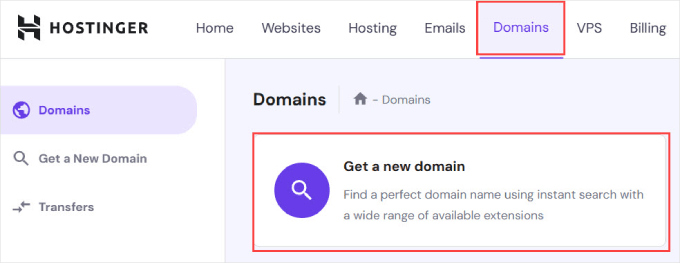
After registering a hosting plan, you typically access a dashboard where you can manage domains. From this interface, you can register a new domain name for your portfolio.
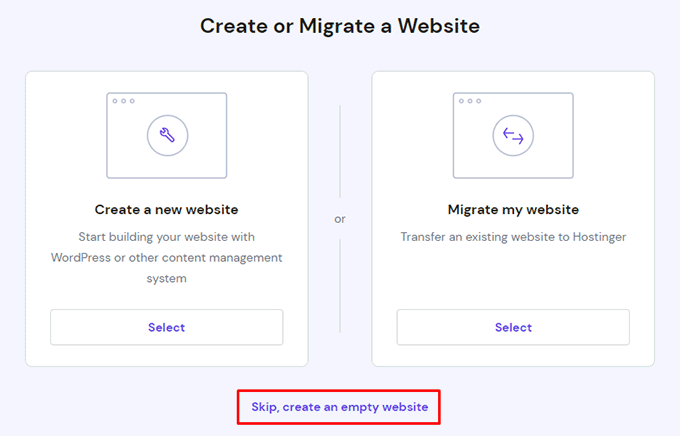
During setup, you'll typically encounter options to create a new site or migrate an existing one. For portfolio creation, you can usually select an option to begin with an empty website.
You'll then typically find an option to register a domain name. Simply enter your desired domain name for the portfolio website.
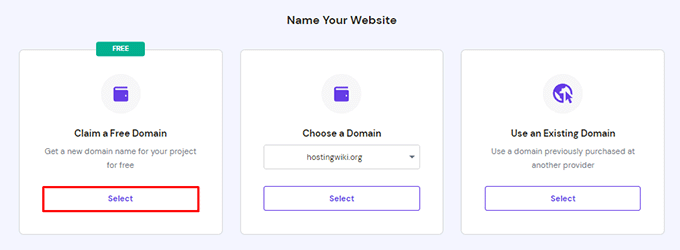
For personal portfolios, using your name as the domain often works well. If unavailable, consider adding your profession—for example, if janesmith.com is taken, janesmithdesigner.com or johnsmithphotography.com might be available.
The .com domain extension generally represents the most recognizable and trustworthy option for professional purposes.


