
Implementing Privacy-Compliant Analytics in WordPress: Two Effective Approaches
Tracking visitor behavior on WordPress sites has become more complex due to evolving privacy regulations, making traditional cookie-based analytics challenging to implement without potential compliance risks.
Websites that gather user data without appropriate consent mechanisms may face regulatory issues and damage visitor trust, particularly in jurisdictions with stringent data protection laws.
After evaluating various configurations, I've identified straightforward methods to monitor website performance while minimizing reliance on conventional tracking cookies.
This guide presents two practical approaches for implementing privacy-conscious analytics within WordPress. The first method utilizes a privacy-enhanced Google Analytics configuration, while the second offers a completely cookie-free alternative.
Is Eliminating Cookies Necessary for WordPress Analytics?
The straightforward answer is that cookies can still be utilized, provided proper consent management systems are implemented.
Many website administrators encounter discussions about cookies and privacy legislation, but understanding the practical implications for WordPress analytics requires clarification.
Cookies represent small data fragments stored within visitors' browsers, and analytics platforms like Google Analytics 4 depend on them to monitor user interactions, including page views, session duration, and conversion events.
This information helps website owners better understand audience behavior and optimize their digital properties.
The primary challenge emerges from contemporary privacy frameworks such as GDPR, CCPA, and ePrivacy Directive, which mandate explicit user consent before deploying tracking cookies. Consequently, numerous site operators believe they must transition to cookie-free analytics solutions to maintain compliance.
However, this assumption requires correction.
Google Analytics can continue providing valuable insights while maintaining regulatory compliance when paired with appropriate consent mechanisms or privacy-conscious configurations.
Understanding Google Analytics 4's Cookie-Limited Tracking Capabilities
GA4 remains a preferred solution because it delivers comprehensive insights while supporting privacy-focused, limited-cookie tracking when properly configured.
For website analytics, Google Analytics 4 continues to offer one of the most robust platforms available for various WordPress implementations. Those seeking accurate, actionable data about visitor interactions typically find GA4 meets their requirements effectively.
Before proceeding, an important distinction requires clarification: GA4 does not depend on third-party cookies. Instead, it employs first-party cookies, which originate from your own domain to collect information exclusively about visitor activity on your WordPress installation.
By contrast,third-party cookies originate from external services and track users across multiple websites. Their broader tracking scope raises greater privacy concerns, leading many browsers to phase out their support.
A common question arises:"Since GA4 continues using cookies—even first-party varieties—can it be implemented in ways that satisfy privacy regulations?"
The response is affirmative.
However, note that Google Analytics does not automatically ensure compliance. Website administrators bear responsibility for implementing the platform according to applicable regulations.
Whether cookie consent becomes necessary for Google Analytics depends on multiple factors, including geographic location of both website operators and visitors, along with data handling procedures.
Since cookie consent legislation varies across jurisdictions, some websites must obtain user consent for specific cookies, while others require banners for any cookie implementation.
To address these requirements, I will demonstrate how to combine GA4 with:
Analytics plugins featuring compliance extensions– These help align data collection practices with GDPR and similar privacy frameworks.
Consent management solutions– These facilitate proper user consent acquisition and administration.
With these components properly configured, GA4 can operate in ways that support privacy regulation compliance, enabling valuable data collection while mitigating legal risks.
Implementing WordPress Analytics with Limited Cookie Usage
Having explained cookie-limited tracking fundamentals and necessity assessments, let's examine practical implementation methods for WordPress installations.
Two reliable approaches exist:
- GA4 with compliance extensions– Monitor user behavior using GA4 while maintaining alignment with privacy regulations like GDPR. This method utilizes first-party cookies with configurable privacy settings. Suitable for obtaining detailed insights with straightforward WordPress integration.
- Cookie-free analytics platforms– Enable analytics implementation without cookies. These solutions store data on your server and may offer hybrid modes with optional cookies.
This tutorial covers both methodologies, supplemented with additional recommendations and frequently asked questions regarding cookie-limited tracking.
Use the navigation links below to proceed directly to your preferred method:
- Method 1: Configuring WordPress Analytics with Limited Cookies
- Method 2: Establishing Completely Cookie-Free WordPress Analytics
- Common Questions About Cookie-Limited WordPress Analytics
- Additional Resources: Further WordPress Analytics Guidance
Let's examine each approach systematically.
Method 1: Configuring WordPress Analytics with Limited Cookies
This approach suits those requiring comprehensive analytics capabilities while respecting visitor privacy. The implementation combines analytics plugins with consent management solutions.
Step 1: Install Analytics Plugin for Cookie-Limited Tracking
Many experienced developers recommend specific analytics plugins for WordPress due to their simplified Google Analytics integration capabilities.
Numerous WordPress professionals utilize these solutions to monitor traffic sources, visitor characteristics, and conversion metrics across various site elements including forms, interactive components, and referral links.
Begin by creating an account with your chosen analytics plugin provider.
Visit the provider's website, locate the registration option, select an appropriate plan, and complete the registration process.
Following registration, access your analytics dashboard to obtain your license credentials.
Proceed to install and activate the analytics plugin within your WordPress administration area. Navigate to Plugins » Add New Plugin to initiate this process.
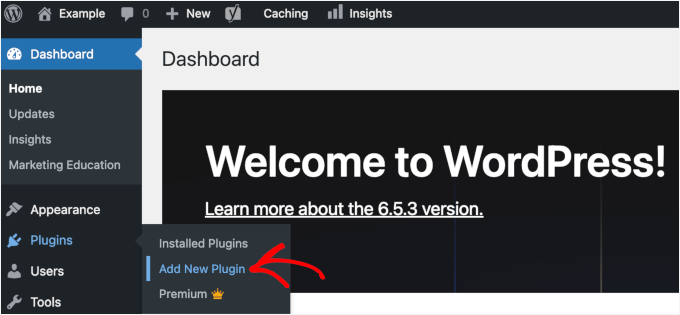
Enter the plugin name into the search field to locate it efficiently.
Select the 'Install Now' option within the search results, then activate the plugin when prompted to enable functionality on your WordPress site.
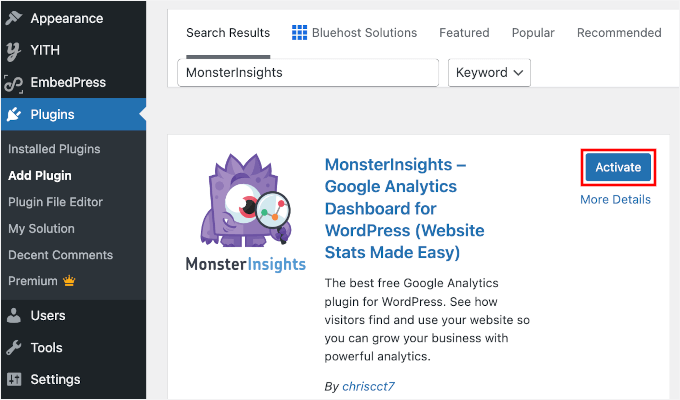
Consult standard WordPress documentation for detailed plugin installation guidance if needed.
Step 2: Connect Analytics Plugin to Google Analytics
With the analytics plugin operational, establish connections between your website and Google Analytics account.
Locate the analytics menu within your WordPress dashboard's navigation panel.
Select the setup wizard initiation option to begin the configuration process.

The subsequent interface will request selection of a category that best represents your website type.
Options typically include WordPress blogs, business websites, or e-commerce stores.


