
Implementing Cohort-Based Learning on WordPress: A Comprehensive Guide
When learners engage with online courses individually, maintaining consistent motivation often proves challenging. Lessons may be overlooked, interactive discussions can diminish, and many participants fail to complete the final modules.
This explains why collaborative learning approaches are gaining popularity; they generate sustained momentum.
Participants advance through educational materials collectively, provide mutual support, and demonstrate higher completion rates.
For those developing courses on WordPress, selecting appropriate tools can transform this collaborative framework into practical implementation. After evaluating numerous learning management system plugins, MemberPress and AccessAlly emerged as notable solutions with robust features designed specifically for group learning environments.
This guide will demonstrate how to establish a cohort-based learning experience that maintains participant engagement throughout the entire educational journey.
Understanding Cohort-Based Online Courses and Their Benefits
Cohort-based online courses, frequently described as group learning programs, represent a structured approach to delivering educational content to multiple participants simultaneously. Learners progress through course materials together as a unified group, typically following predetermined start and conclusion dates.
The following example illustrates a cohort-based online course structure:
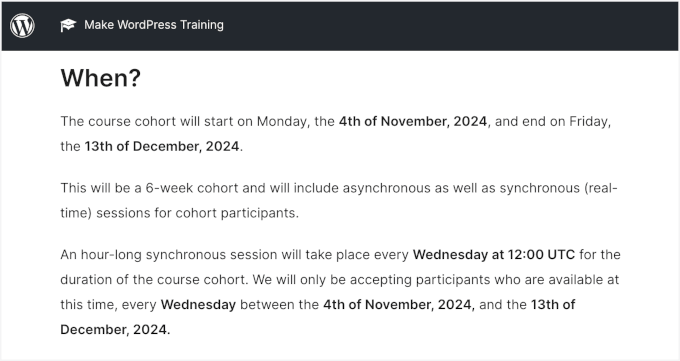
This educational format fosters community development and promotes accountability among participants. Students gain opportunities to interact with instructors and fellow learners, creating a more engaging and collaborative educational experience.
Implementing group courses offers several advantages:
- Ideal for participants who benefit from group interaction and prefer scheduled learning structures
- Enables creation of personalized learning environments where customized support can be provided and stronger student relationships can develop
- Group dynamics encourage participants to maintain progress, ensuring optimal course completion rates
Why WordPress Serves as an Effective Platform for Group Learning
Developing distinctive group courses that establish supportive learning communities requires appropriate platform selection.
WordPress represents a recommended solution.
WordPress functions as one of the most capable platforms for creating and managing group learning courses. It provides comprehensive tools and flexibility necessary to design courses according to specific requirements.

With WordPress, powerful learning management system plugins such as MemberPress or AccessAlly can be implemented to configure courses, manage student registrations, and develop interactive lesson materials.
Additionally, content and revenue remain under complete control. Unlike third-party platforms, WordPress does not deduct earnings or impose restrictions on course management.
Customization represents another significant benefit.
Whether incorporating discussion forums, private messaging systems, or live video sessions, WordPress simplifies adaptation of websites to accommodate group learning requirements.
Developing Effective Cohort Syllabi
When designing syllabi for group-based online courses, emphasis should be placed on fostering collaboration and teamwork. Unlike self-paced alternatives, this learning approach thrives on shared educational experiences.
Begin by outlining primary learning objectives for the group. Consider incorporating activities such as collaborative projects or peer review systems to facilitate interaction and constructive feedback among participants.
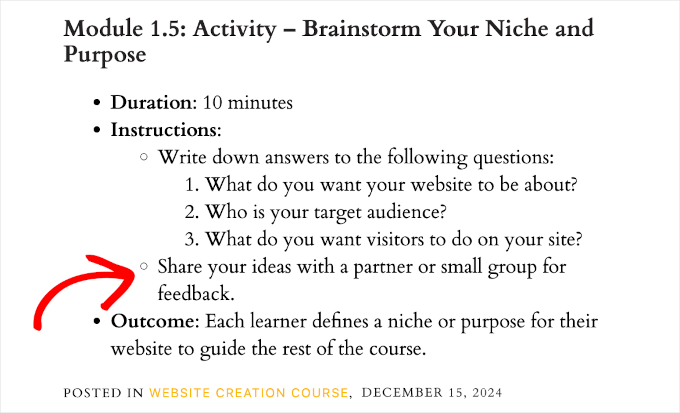
Regular discussion opportunities, including live sessions, forum participation, or group communication channels, help maintain participant engagement and connection.
With these considerations established, we will now demonstrate how to implement WordPress group learning functionality.
Utilize the following navigation options to proceed directly to preferred implementation methods:
- Method 1: Implementing WordPress Group Learning with MemberPress CoachKit (Recommended for Coaches and Small Enterprises)
- Method 2: Implementing WordPress Group Learning with AccessAlly (Recommended for Robust Online Communities)
- Additional Recommendation: Hosting Live Question and Answer Sessions to Enhance Engagement
- Frequently Asked Questions Regarding Cohort-Based Online Courses and WordPress Group Learning
- Supplementary Resources for Online Course Development
Let's begin the implementation process.
Method 1: Implementing WordPress Group Learning with MemberPress CoachKit (Recommended for Coaches and Small Enterprises)
For those seeking to establish group learning environments with centralized discussion hubs and membership access controls, MemberPress combined with the CoachKit extension represents an effective solution.
MemberPress provides comprehensive functionality for creating, marketing, and managing various membership programs. Many WordPress professionals utilize this solution for their educational platforms.
This comprehensive membership and learning management system plugin streamlines implementation processes.
The CoachKit extension extends functionality by enabling creation of unlimited group coaching programs within WordPress. You can establish milestones and habit-tracking systems to monitor learner progress while facilitating live discussions or consultation sessions.
Establishing Membership Structures Using MemberPress
To commence, install and activate the MemberPress plugin. For installation assistance, consult standard WordPress plugin installation documentation.
Following activation, complete the setup wizard configuration.
Initially, configure payment processing methods. Navigate to MemberPress » Settings and select the 'Payments' section.
From this interface, select the '+ Add Payment Method' option to integrate preferred payment gateways.
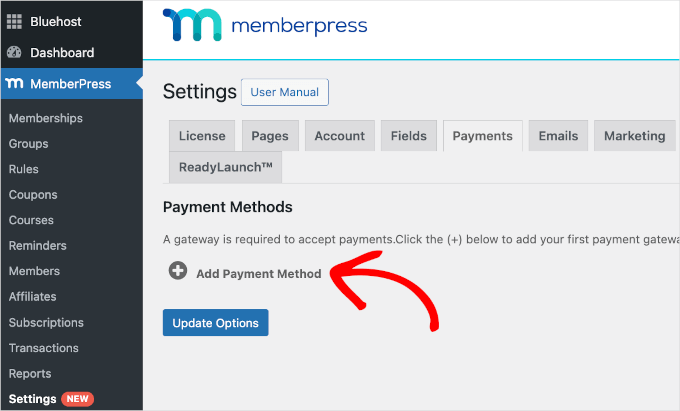
MemberPress supports integration with PayPal and Stripe payment systems. This functionality enables straightforward credit card payment acceptance for WordPress group learning programs.
To finalize configuration, enter payment gateway account credentials. Upon completion, select the 'Update Options' button to save changes.
Subsequently, create membership plans for group learning websites. These represent paid subscription plans that students will purchase to access online course materials.
To initiate this process, navigate to the MemberPress » Memberships page and select 'Add New.'
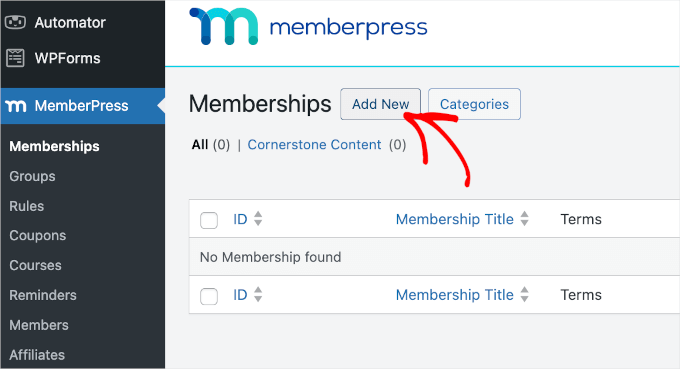
On the subsequent screen, enter title and descriptive information for the membership plan.
Configure pricing structures, billing types, and expiration parameters within the 'Membership Terms' section.
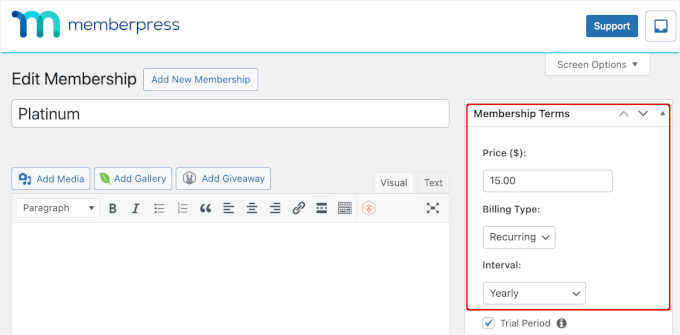
Additional customization options become available when scrolling through the editor interface.
For instance, within the 'Price Box' section, supplementary details can be incorporated into pricing pages, including header information.


