8 Proven Strategies to Minimize Network Payloads in WordPress
By Editorial Team |
Does your WordPress site seem to load at a glacial pace, despite your optimization efforts?
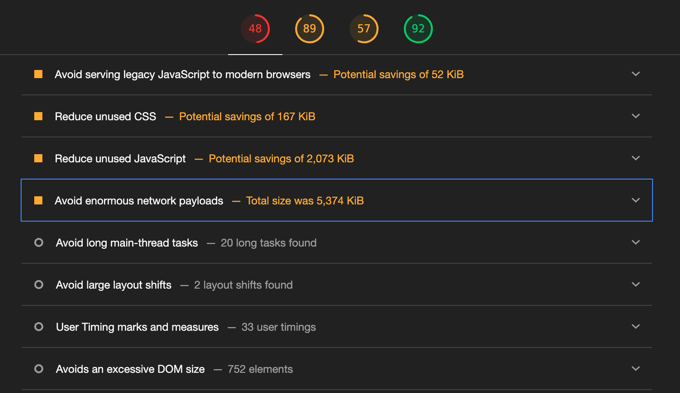
When you conduct a speed analysis, you might encounter the 'Avoid enormous network payloads' alert.
While this terminology sounds complex, it essentially indicates that your webpage is transporting excessive data.
Many WordPress experts have encountered this specific warning and developed effective solutions to address it.
This comprehensive guide will demonstrate practical methods to decrease file sizes and prevent substantial network payloads within WordPress.
Understanding the Impact of Large Network Payloads
Have you utilized tools such as Google Lighthouse or PageSpeed Insights to evaluate your website's loading performance?
These tools sometimes display the message 'Avoid enormous network payloads.'
This warning signifies that your webpage contains excessive data, similar to an overloaded suitcase. Larger webpages require more time to load, potentially frustrating visitors.
A webpage's network payload represents the combined size of all components that constitute that page. These elements include:
- Text Content: The written material displayed on the page
- Visual Media: Photographs and video content
- Code Files: CSS and JavaScript resources that control appearance and functionality
- Typography: Custom font styles for textual elements
- Additional custom components
The larger these combined elements become, the longer your webpage requires to display completely.
What constitutes excessive size? Consider these general guidelines:
- Optimal: When total webpage components measure less than 1.6 MB, your site is well-optimized and loads rapidly. This represents minimal concern.
- Requires Attention: Webpages between 2 MB and 4 MB indicate potential optimization opportunities. Performance tools typically provide specific recommendations for improvement.
- Problematic: Pages exceeding 4-5 MB create significant loading delays for visitors. This situation demands immediate optimization priority.
When you encounter the 'Avoid enormous network payloads' notification, you can expand it to view all resources contributing to your webpage size.
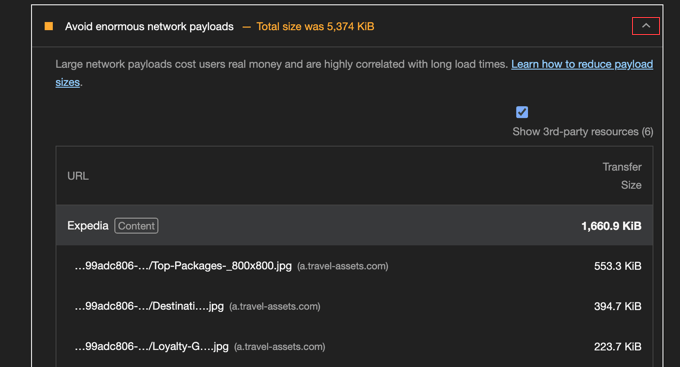
Notice that the largest files appear at the list's beginning. Concentrating optimization efforts on these substantial files or eliminating unnecessary resources typically yields the most significant WordPress performance improvements.
Reducing these file sizes decreases data consumption during webpage viewing and accelerates loading times.
Now that you understand why substantial webpages present problems, let's examine practical methods to prevent them in WordPress. This article covers eight essential strategies:
- Optimize Image File Sizes
- Implement Proper Video Embedding Techniques
- Apply Lazy Loading to Images and Videos
- Minimize JavaScript and CSS File Sizes and Quantities
- Compress Files Using Gzip
- Implement Browser Caching to Eliminate Redundant Downloads
- Limit Font Usage or Employ System Fonts
- Identify and Replace Performance-Heavy Plugins
- Common Questions Regarding WordPress Network Payloads
Let's begin our exploration.
1. Optimize Image File Sizes
Oversized images frequently contribute substantially to network payload issues.
Contemporary smartphones and digital cameras produce high-resolution images with considerable file sizes. However, displaying these images on websites doesn't require maintaining their original dimensions.
Fortunately, you can optimize images to reduce file sizes by up to 80% without compromising visual quality. This optimization typically impacts website network payloads more significantly than other adjustments.

Many experienced developers optimize all images before uploading them to their websites. This process involves resizing images to appropriate dimensions and reducing file sizes using various optimization tools.
Numerous resources exist that explain effective methods for optimizing web images while preserving quality.
2. Implement Proper Video Embedding Techniques
Website videos require careful implementation to avoid performance issues.
Directly uploading videos to your website can generate substantial network payloads and significantly decrease loading speeds, particularly when videos auto-play.
The most efficient approach involves embedding videos from dedicated platforms like YouTube or Vimeo.
This method allows video playback on your website while storing the actual video files on external servers, excluding them from your network payload calculations.
This strategy benefits your website because your server avoids handling substantial data transfers. Additionally, these platforms specialize in efficient video delivery with optimized streaming that adapts to visitors' connection speeds.
Many embedded video players only initiate loading when users activate playback, reducing initial data transfer requirements.
You can easily incorporate videos into your website using standard embed codes.
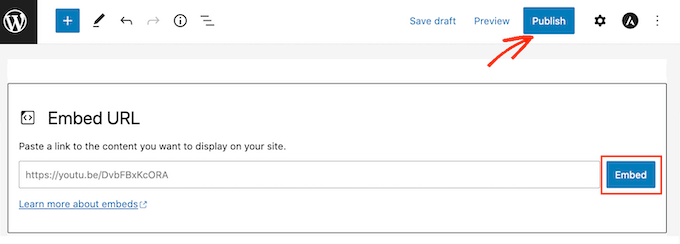
This approach represents standard practice for video implementation in WordPress environments.
3. Apply Lazy Loading to Images and Videos
Lazy loading provides another effective method for managing network payloads, particularly on media-rich websites.
Conventionally, browsers attempt to download all images and videos immediately upon webpage loading, regardless of whether users will view them.
Consider a restaurant serving all meal courses simultaneously rather than sequentially. This overwhelming approach parallels what occurs on webpages without lazy loading implementation.
Without lazy loading, browsers download data for entire pages immediately, even when users might never scroll to view bottom content.
This creates substantial initial network payloads unnecessarily.
The solution involves implementing lazy loading technology.
Lazy loading functions like that restaurant serving each course as you're prepared to consume it.
With lazy loading enabled, images and videos load only as they approach the user's visible screen area. This approach ensures browsers load necessary content precisely when required.
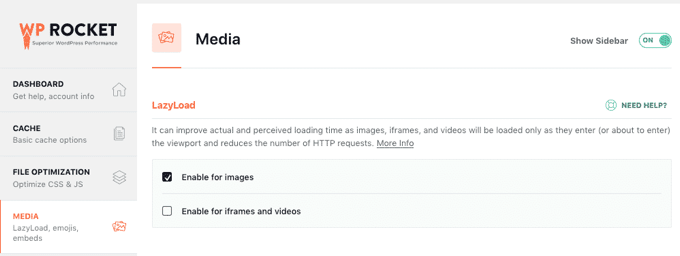
This methodology reduces initial network payloads and decreases overall data download requirements.
Various methods exist for implementing lazy loading within WordPress installations.
4. Minimize JavaScript and CSS File Sizes and Quantities
Reducing CSS and JavaScript file sizes represents one of the most effective approaches for managing network payloads.